All of the configuration of vice is via JSON-formatted files.
Extending vice to include more airports or additional scenarios is a matter
of generating additional JSON that provides the necessary information.
In the following, the use of terms like "element", "object", "member", "array", etc.,
correspond to their use in the JSON specification. See this page for reference.
When developing scenarios, you might make a copy of an existing scenario's JSON file and modify it in order to add more configurations,
or you or might specify completely new scenario and video map files if you're working on support for a new TRACON.
As part of this you may also need to modify the configuration file for the facility.
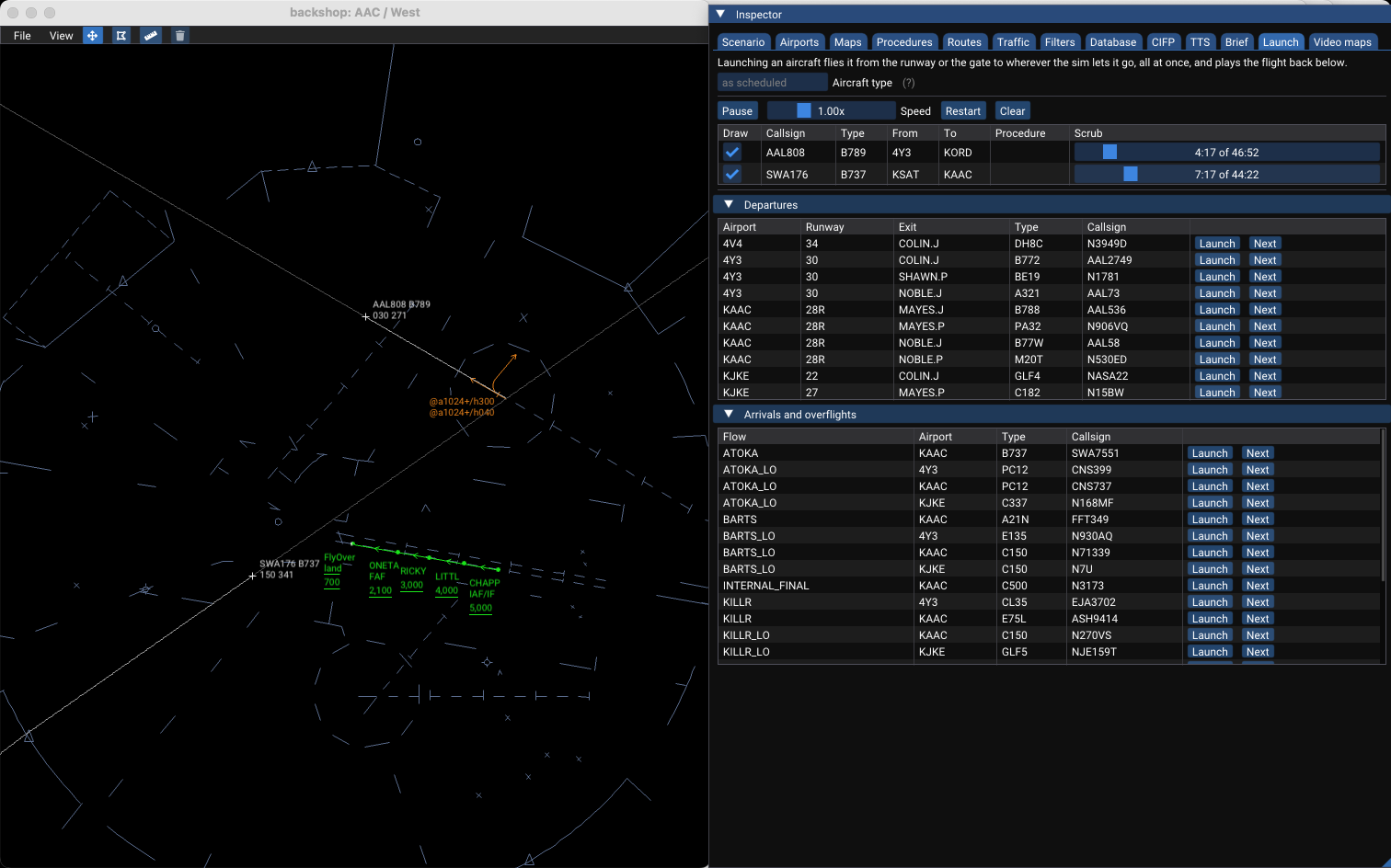
As you work, you can use backshop to check your work; it's a stand-alone tool for scenario development in vice.
Alternatively, you can have vice load your updated files when it launches and run the scenarios as a user would there;
Backshop
backshop is a stand-alone application for facility engineering: you can provide it with updated scenario / config files (or use it to explore the built-in ones) and it provides comprehensive information about the structure of scenarios, their routes, maps, etc.
Everything it shows
can be copied to the clipboard, since it is all destined for hand-written JSON.
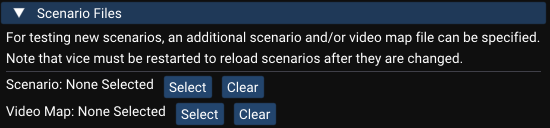
Work-in-progress scenario, video map, brief, and facility configuration files can be specified
under "Additional files" in the Scenario tab.
Most importantly, it reloads edited scenario JSON in place: pressing [Control-R]
([Command R] on macOS) re-reads the scenario and facility configuration files from disk,
along with the aviation database and the pronunciation files behind it, and restarts the sim on them,
so there is no need to quit and relaunch after every edit (as is the case when checking scenarios with vice
If the edited files don't
validate, the errors are listed in the Scenario tab and the previously loaded scenario keeps
running.
backshop displays two windows: a map window and an inspector. The map supports:
Dragging to pan and the scroll wheel to zoom.
Control-shift-click to copy a position to the clipboard, as in vice. The position under the
cursor is also always shown in the menu bar and can be copied by clicking it.
A route-drawing mode equivalent to .DRAWROUTE, switched on from the buttons in the
menu bar: click a series of points and they are kept on the clipboard as a space-separated list.
[Backspace] removes the last point and [Escape] leaves the mode.
A measuring mode, alongside it: click two points for the distance and magnetic bearing between
them.
The inspector window alongside it has a tab for each general category of information that can be examined:
Tab
Contents
Scenario
Which facility, scenario group, and scenario to open; reloading; the errors
from the last load; and a summary of the scenario.
Airports
The scenario's airports, each of which expands to how it is set
up: its settings and traffic rates, the runways the scenario is working, the approaches to the
ones it is landing on, the exits departures leave by, the arrivals that bring traffic in, and the
SIDs and STARs the FAA CIFP charts there. The routes are all shown in the encoded form that goes
into a scenario's JSON, with a copy button and a checkbox that draws each one.
Maps
Every video map in the facility's library along with the ones vice
generates from the facility configuration—the filter regions, minimum vectoring altitudes,
nearby class B and C airspace, radar coverage, and ATPA volumes—each with a checkbox to draw
it. An ARTCC's library is a set of map groups of which the display loads one at a time, so each
gets a collapsible section of its own, the scenario's group first and open.
Procedures
Draw the geometry of the scenario's arrivals, approaches, departures,
overflights, controller airspace, and charted holds, each in a color of your choosing. Departures
can be listed a SID at a time or an exit at a time, since a SID serving twenty exits is unreadable
drawn all at once.
Routes
The ways a city pair is really flown—from the scenario's own
traffic_routes, the recently filed routes, and the FAA route databases—and what
this scenario would do with each of them: which exit or arrival it would fly, or why it can't fly
the route at all.
Traffic
The real-world traffic the scenario's airports see, from a timetable or from
recorded flights, and what the scenario would do with each flight. It is a report, not a
simulation: nothing here changes the running sim. It is how to find the exits and arrivals a
scenario is missing.
Filters
Every adapted filter region with its shape and altitudes, plus TFRs, ATPA
volumes, and radar coverage. Each has a checkbox that draws its extent on the map.
Database
Airports, navaids, fixes, airways, aircraft types, airlines, and
facilities from vice's aviation database. Airports, navaids, fixes, and facilities can be
drawn on the map individually or all at once, labelled.
CIFP
The SIDs, STARs, and approaches the FAA CIFP codes for an airport, in the
encoded form that goes into a scenario's JSON—the same thing vice -routes
prints, with a copy button on each row.
TTS
How vice says the names at the scenario's airports. Every SID, STAR,
and approach is listed with the fixes it is flown over, each named once however many of its
transitions go by it; a play button reads a procedure and its fixes in turn, lighting up each
name as it is spoken, and clicking any one of them says just it. A SID, STAR, or fix name can
also be typed in to hear it. It is how to check an entry in resources/sayfix.json and the
other pronunciation files, which a reload picks up.
Brief
A live preview of the facility's scenario brief, annotated video maps
included.
Launch
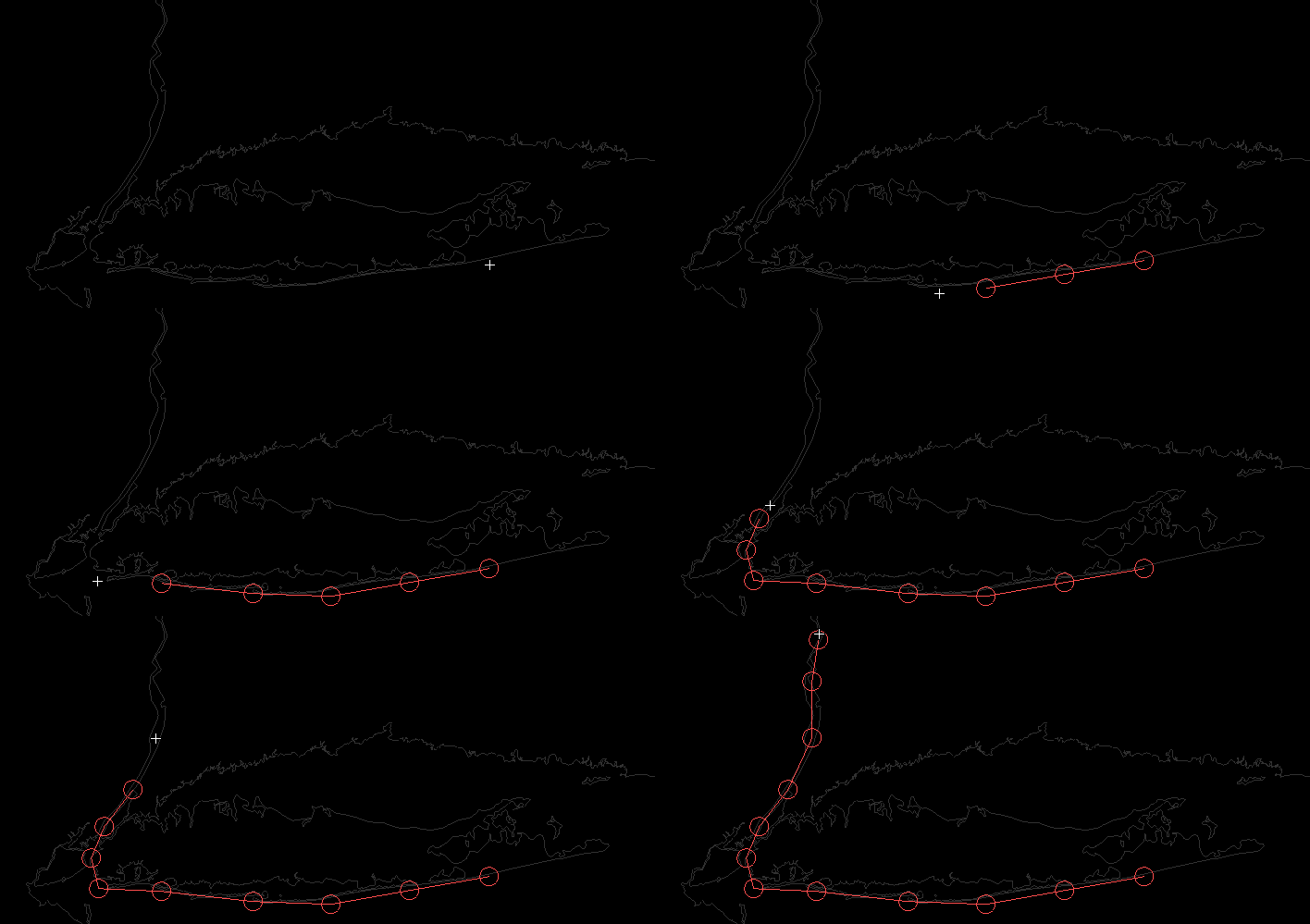
Fly one aircraft at a time down a chosen procedure and watch it. Automatic
traffic starts switched off so the scope is empty; launching an aircraft flies it from the runway
or the gate to wherever the sim lets it go, all at once, and plays the flight back with a scrubber
that goes both ways. An ICAO type can be given to fly the procedure with a particular aircraft's
performance rather than whatever the scenario sampled.
Video maps
Converts a CRC installation's video maps to .mappack files, one
per STARS facility of each selected ARTCC plus one for the ARTCC's ERAM maps, and lists what a
map library holds so that one can be inspected without a scenario that refers to it.
On Windows, backshop is an option in the installer; tick "Facility engineering tool" when
installing vice. On macOS it is a separate Backshop.app, which can be downloaded below;
after opening the zip file, drag Backshop.app to your Applications folder to
install it.
Another way way to try out your work is to open the "Settings" menu in vice (shown by clicking the icon in the menu bar)
and selecting "Facility Engineering". There, you can specify the locations of additional scenario, video map, and/or facility configuration files to load when vice is launched.
Alternatively, if you're comfortable with the command line, you can specify additional files with command-line arguments.
On Windows, open up a command prompt and set the directory to the folder with the vice executable (generally,
C:\Program Files (x86)\Vice. Then, run
vice.exe -scenario path_to_scenario_file -videomap path_to_videomap_file. On MacOs,
it's very similar: change the directory in the terminal to where Vice.app is located (often, /Applications/Vice.app,
depending on where you installed it. Then, run ./Vice.app/Contents/MacOs/vice -scenario path_to_scenario_file -videomap path_to_videomap_file.
If you're editing an existing scenario, you may want to make a copy of it to a folder outside of resources/scenarios
to edit it there. In that case, if the scenario given via the UI or command line has the same "name"
value as an existing scenario, it will be used in place of the existing one.
When you're working on a new scenario, you may omit the "video_map_file" specifier in its JSON file.
In this case, vice will automatically use the video map file you specified via -videomap
or via the UI.
Specifying Locations
Throughout the vice configuration files, it's often necessary to specify various locations on the Earth.
vice has a built-in database of all of the airports, VORs, NDBs, and fixes in the United States (courtesy of the FAA),
which allows using these directly for specifying locations. The locations of runway thresholds are available via the syntax
KJFK-22L where the airport identifier and runway specifier are separated by a hyphen. The identifier may be
three characters as well as four, so airports without an ICAO identifier are written like 6A1-19.
Locations can also be specified via
latitude-longitude positions, given as strings. For convenience, multiple latitude-longitude formats are supported.
Encoding
Description
Example
Name of VOR/NDB/fix
A string giving the name of an airport, VOR, NDB, or fix in the United States.
"JFK"
Decimal value pair
A pair of decimal numbers where the first specifies the latitude and the second specifies the longitude.
"40.6328888,-73.771385"
Degrees minutes
Latitude encoded with 4 digits representing degrees and minutes (sixtieths of a degree), followed by "N" or "S",
followed by a slash and then 5 digits representing degrees and minutes longitude, followed by "E" or "W".
"4037N/07346W"
Degrees, minutes, seconds
A pair of values with position specified in degrees, minutes, and seconds, separated by periods.
"N" and "S" are used to distinguish North and South latitudes and similarly for "E" and "W" with longitudes.
"N40.37.58.400,W073.46.17.000"
ISO6790 Annex H
A more compact degrees/minutes/seconds representation; see the Wikipedia page for details.
"+403758.400-0734617.000"
(In all of the examples above, the location specified is the same—the JFK VOR.)
A location can also be given as a fix-radial-distance (FRD): the name of a fix followed by three digits
giving a magnetic radial from it and three giving a distance from it in nautical miles. For example,
"JFK090020" is 20nm from the JFK VOR along its 090 radial. As in the real world, a VOR's radials
are referenced to its station declination; radials from any other fix are referenced to the magnetic
variation where it is.
In vice, if you hold down the control and shift keys and click on a point on the video map, the corresponding
latitude-longitude position is copied to the clipboard—this can be very useful when developing new scenarios!
Running a Server Locally
If you're working on multi-controller support for a
scenario, you may want to run a vice server locally to
debug it. The server is a separate executable,
viceserver (viceserver.exe on
Windows), which is installed alongside vice itself.
A few command-line options are useful:
viceserver (with no arguments) launches a
vice server on your local system.
-server (passed to the vice
client) specifies the IP address and (optionally), the
port of a vice server to connect to. Specifying
localhost will connect to a local server
launched via viceserver.
-port allows specifying a custom port number
for the server to listen on (passed to both
viceserver and to the vice client's
-server address, which should then be of the
form hostname:port).
Windows Example: Running a Local Multi-Controller Server
Here's a step-by-step guide for testing multi-controller scenarios on Windows:
Launch Command Prompt: Press the Windows key, type "cmd" in the search box, and press Enter.
Navigate to the vice directory: Enter cd "c:\Program Files (x86)\Vice" Note: The quotes are essential if the path contains spaces.
Start the multi-controller server: Enter viceserver.exe
If there are errors in your scenario configuration, they will be displayed here. Otherwise, the server launches and will be
running in the background.
Launch the first controller instance: Enter vice.exe -server localhost
This launches vice connected to your local server. In the "New Simulation" window, you'll see the option to "Create multi-controller" simulation.
Launch additional controller instances: For each additional controller position, open another Command Prompt
and enter: vice.exe -server localhost
Each new instance can connect to the simulation created by the first controller. You'll be able to perform handoffs and coordinate between the different controller positions by switching between the vice windows.
Restarting after scenario changes: If you modify your scenario files, you must restart the server to load the changes.
(backshop reloads scenario edits in place without restarting, but it runs a
single-user sim of its own; a multi-controller server still has to be restarted.)
Close all vice client windows
In the Command Prompt window running viceserver.exe, press Ctrl+C to stop the server
Return to step 3 above to restart the server with your updated scenario
Routes
Aircraft routes are given as a series of fixes, with each one's location specified using
a fix name or a lat-long coordinate, as described in Specifying Locations.
Airways may also be used; for example, WHITE V1 DPK has the aircraft join the V1 airway
departing WHITE and follow V1 until DPK.
(The alternative, WHITE DIXIE MOVFA JFK DPK, is
more typing and more error-prone to enter.)
Each fix in a route may have one or more actions, properties, and triggers
that affect the aircraft's course of flight—for example, that the aircraft should depart a fix
at a given heading or that the fix should be strictly overflown (versus aircraft "cutting the corner" and turning to
the next fix early so that it cleanly rolls out on course.) Each of these is detailed in the following sections. In the tables below, the parts of
each entry to be typed literally are upright and the values to be supplied are in
italics.
Actions
Most actions affect the aircraft's course of flight upon passing the fix they are associated with.
For example, an aircraft flying the route: SKORR METSS RNGRR/h223 RBV
will fly from SKORR to METSS and then to RNGRR,
after which it will fly heading 223.
It will stay on that heading until a controller instructs it to proceed to RBV (or to a subsequent
fix in its route.)
These actions affect the lateral course that an aircraft flies after leaving a fix:
Syntax
Description
/hheading
Depart the fix at specified heading, choosing a left or right turn based on which is shorter.
/lheading
Depart the fix at specified heading, turning left.
/rheading
Depart the fix at specified heading, turning right.
/ph
Depart the fix continuing to fly the present heading (rounded to the nearest 5 degree increment)
/ld
Continue direct to the next fix, but turn left to do so.
/rd
Continue direct to the next fix, but turn right to do so.
/theading
Depart the fix on the specified track heading; this corrects for wind so the aircraft maintains the desired ground track.
/tfix-Rradial
Depart the fix to join the specified radial from the given fix.
For example, given /tPXR-R336, the aircraft will join the PXR 336 radial,
converging at up to 45 degrees, and then follow it away from PXR.
A VOR's radials are referenced to its station declination, as charted, so they lie where
the chart depicts them even where the local magnetic variation has drifted since the
station was aligned; radials of a fix that isn't a VOR use the area's variation.
/ltheading
Depart the fix on the specified track heading, turning left.
/rtheading
Depart the fix on the specified track heading, turning right.
/ltfix-Rradial
Depart the fix, turning left to join the specified radial from the given fix.
/rtfix-Rradial
Depart the fix, turning right to join the specified radial from the given fix.
For approach fixes involved with procedure turns, a number of actions can be specified:
Syntax
Description
/hilpt / /hilptdistnm / /hilptdistmin
There is a hold in lieu of procedure turn (i.e., a racetrack procedure turn) associated with the fix.
The default is right turns and a 1 minute limit for ILS/VOR/LOC approaches and a 4 nm limit for RNAV approaches.
Different limits can be specified: for example /hilpt6nm gives a procedure turn with a 6 nm limit and
/hilpt2min specifies a 2 minute limit.
/lhilpt / /lhilptdistnm / /lhilptdistmin
There is a hold in lieu of procedure turn associated with the fix, but with left turns.
Distance and time defaults are as above and can be overridden in the same way.
/pt45 / /pt45distnm / /pt45distmin
Specifies a standard 45 degree procedure turn with the same options as /hilpt.
/lpt45 / /lpt45distnm / /lpt45distmin
Specifies a standard 45 degree procedure turn with left turns, also using the
same options as /hilpt.
/ptaaltitude
If the aircraft should descend during the procedure turn, this can be used to specify
the final altitude it should have at the end of the turn. (The altitude should be given in feet.)
If the aircraft should follow an arc leaving a fix rather than flying direct to the following
fix, /arc can be given. It can be used in two ways.
Syntax
Description
/arcmiles
The aircraft flies an arc of the given length.
For example, WUPMA/arc7.5 ALABE has aircraft fly along the 7.5nm long arc between WUPMA and ALABE.
/arcmilesfix
Both a radius in nautical miles as well as the fix at the
center of the arc's circle can be specified. For
example, HANAV/arc16OMN specifies a 16nm radius
arc centered at OMN.
/larcmiles / /rarcmiles
The aircraft flies an arc of the given length, turning left or right, respectively, leaving the fix.
/larcmilesfix / /rarcmilesfix
The aircraft flies an arc of the given radius centered at the given fix,
turning left or right, respectively, leaving the fix.
For VFR aircraft flying routes specified in scenarios, an action is available to have them perform
airwork upon reaching a fix.
Syntax
Description
/airwork
The aircraft will perform airwork centered around the fix. An altitude
restriction must be specified using the /a property described
below to give an altitude range for the airwork. By default, they will do so
for 15 minutes and remain within 7nm of the fix; alternatively, the time or
distance may be specified
via /airworkradiusnm
and/or /airworkminutesm. For
example: /airwork30m10nm specifies 30 minutes of airwork within a
10nm radius of the fix.
A number of actions are provided for aircraft that are being controlled by virtual
controllers; these help increase the realism of how virtually-controlled aircraft
behave. If an aircraft under the control of a human reaches a fix with any of the following
actions, the action is ignored.
Syntax
Description
/caltitude
The aircraft is issued an instruction to climb to the specified altitude, given in feet (a multiple of 100, between 100 and 60,000).
/clearapp
Clears the aircraft for the approach that has been assigned to it (e.g. via "expect_approach" in a STAR.)
Aircraft must either be on a heading that intersects the approach or direct to a fix on the approach.
/cpsp
Clears the aircraft's primary scratchpad.
/cssp
Clears the aircraft's secondary scratchpad.
/cvaltitude
The aircraft is instructed to climb via the SID, except maintain the specified altitude, given in feet.
/cvs
The aircraft is instructed to climb via the SID.
/daltitude
The aircraft is issued an instruction to descend to the specified altitude, given in feet (a multiple of 100, between 100 and 60,000).
/dvaltitude
The aircraft is instructed to descend via the STAR, except maintain the specified altitude, given in feet.
/dvs
The aircraft is instructed to descend via the STAR.
/ho
The aircraft is handed off to the human controller assigned to their route.
/hoposition
The aircraft is handed off to the given control position; the position must be a virtual
controller. The handoff will be automatically accepted a little while after it has been initiated.
/intercept
Instructs the aircraft to intercept the assigned approach.
/poposition
The aircraft is pointed out to the given position (may be virtually- or human-controlled).
/spspscratchpad
Sets the aircraft's primary scratchpad to the given value.
/ssspscratchpad
Sets the aircraft's secondary scratchpad to the given value.
/tc
"Transfer comms": the aircraft is told to switch to the frequency of the controller that accepted
its handoff. This can be used to flash a handoff early from a virtual controller, but for them
to continue to control the aircraft for a while before sending it to a human. If not specified in a route,
a handed-off aircraft will change frequency a little while after its handoff was accepted.
For departures, this determines when the aircraft contacts the departure controller.
Finally, actions are available to remove aircraft from the simulation.
Note that vice automatically deletes aircraft after they land or when they have flown
a few hundred miles outside of the facility.
Syntax
Description
/delete
Deletes the aircraft from the sim.
/land
If the aircraft is within 200' of the fix's altitude restriction, it lands and is deleted;
otherwise it goes around.
At an ERAM facility, the altitudes these actions assign are entered in the data
block as well, as the virtual controller issuing them would have entered them:
/d and /dv amend the assigned altitude, as do
/c and /cv to an altitude at or above it, while a climb
that stops short of the assigned altitude becomes an interim altitude. See
ERAM Data Block Entries.
Properties
Fix properties can be used both to affect how an aircraft is flying when it reaches
the fix—cross FIX at or above 10,000, for example—as well as
to give the sim additional information about the fix's role in approaches and such.
The following restrictions determine how an aircraft approaches a fix:
Syntax
Description
/arestriction
For IFR aircraft, cross the fix with the specified altitude restriction
(with altitudes specified in feet).
For VFR, aircraft will be at a random altitude within the given altitude range.
The following options are available for specifying altitude restrictions:
low-high: cross at an altitude between low and high.
alt-: cross at or below alt.
alt+: cross at or above alt.
alt: cross at alt.
/sspeed
Cross the fix at the given speed. The speed may include a
+ suffix for "at or above" (e.g. /s210+) or a - suffix
for "at or below" (e.g. /s250-). A range may also be specified (e.g. /s180-210).
Speeds are in knots by default and must be between 50 and 350; Mach speeds can be given with
M, such as PUCKY/sM78-
to cross PUCKY at Mach 0.78 or less.
/flyover
Indicates that the fix is a flyover fix (as opposed to the
default, fly-by). Aircraft must pass directly over flyover
fixes before turning to the next fix, while they may turn early with fly-by fixes.
Two fix properties affect how aircraft passing the fix fly (or don't fly) subsequent procedure turns:
Syntax
Description
/nopt
When specified at a fix prior to one with a procedure turn, indicates that aircraft that
pass that fix should not fly the procedure turn.
/nopt180
Specifies that aircraft approaching the fix in the 180 degree semicircle of directions aligned
with the final approach course should not perform the procedure turn. (As an example, see the
KJAX RNAV Z 8 approach;
this applies for aircraft between heading 346 and 166 arriving at UDAQI.)
For fixes on approach courses, three properties can be used to specify the role of a fix in an approach.
If a fix has multiple roles (e.g., is an IAF and an IF), then both may be specified.
Syntax
Description
/iaf
Indicates that the fix is an IAF (initial approach fix).
/if
Indicates that the fix is the IF (intermediate fix).
/faf
Indicates that the fix is the FAF (final approach fix).
This must be specified for exactly one fix in each approach.
Two properties allow adding random variation in how aircraft fly their routes.
These are useful both for VFR aircraft, which may meander around a bit, and also
for simulating virtual controllers doing vectoring so that aircraft being vectored
don't always turn at exactly the same points.
Syntax
Description
/radiusmiles
Each time an aircraft flies the route, the fix they fly to is randomly shifted to a point
in a circle centered at the fix within the given number of miles.
/shiftmiles
Rather than flying precisely to the fix, the aircraft will fly along
the route to the fix but will turn for the next fix at a random distance before or after the fix,
up to half the number of specified nautical miles in each direction.
Triggers
Finally, actions may be sequenced with triggers.
A trigger specifies requirements that must be satisfied before subsequent actions are taken at a fix.
For example, given MERIT/h039/@a5000+/r055, the aircraft flies heading 039
departing MERIT until it reaches an altitude of 5,000'. Then, it turns right to heading 055.
A trigger must follow an action after a fix;
to fly the present heading until a trigger is met, give /ph explicitly.
A heading given after the final trigger, like /r055 here, is flown until the
controller intervenes. If the actions after the final trigger give no
heading—a handoff, say, as in MERIT/h039/@a5000+/ho—they run when
the trigger is met and the aircraft then continues on its route.
Note that triggers do not apply to properties, only to actions: in other words,
given MERIT/h039/@a5000+/s210/nopt, both /s210 and /nopt
apply to the fix immediately, not just after the aircraft passes 5,000'.
The available triggers are:
Syntax
Description
@aaltitude+ / @aaltitude-
Triggers when the aircraft is at or above (+) or at or below (-) the given altitude, specified in feet.
A departure that has climbed through the altitude before reaching the fix meets a + trigger as soon as it passes the fix.
@ddistance
Triggers when the aircraft is the given distance, in nautical miles, from the point where the
preceding action took effect. This is how to express legs charted as a track from a fix for a
distance; for example, the KPBF ILS 18's course reversal at NETAA is
NETAA/t338/@d7.9/lt208/@crs178 REYLO: track 338 from NETAA for 7.9 nm,
then turn left to track 208 until intercepting the 178 course to REYLO.
The distance is measured in a straight line from that point, not along the path flown, so a
short distance after a large turn is reached during the turn, before the new heading is
established.
@navaid-Ddistance+ / @navaid-Ddistance-
Triggers when the aircraft is at or beyond (+) or within (-) the given DME distance from the
navaid or fix. For example, KARRS/h039/@CAMRN-D4.0+/l010 flies heading 039
until the aircraft is 4DME from CAMRN and then turns left to heading 010.
@navaid-Rradial
Triggers when the aircraft crosses the specified radial. For example,
KDLS-25/h120/@LTJ-R165/c4000 flies heading 120 until crossing the LTJ 165 radial,
after which the aircraft is instructed to climb to 4,000' feet.
Note that radials extend in only one direction from a fix. As with /t,
a VOR's radials are referenced to its station declination.
@crscourse / @crsnavaid-Rradial
Triggers when the aircraft should turn in order to fly the given magnetic course to the next fix on
the route. This is how to express procedures that
read like "fly heading 200, then track 220 to WAVEY": RNGRR/h200/@crs220 WAVEY.
When the leg runs along a navaid's radial, as in "climb heading 164 to intercept the SEA
R-161", give that radial in place of the course—KSEA-34R/h164/@crsSEA-R161
NEVJO—so that it is referenced to the station's declination as charted, as with
/t and @navaid-Rradial. The radial names the
line only, since a leg may fly it either inbound or outbound; the fix that follows gives the
direction along it, so the KSAN SHAMU1's leg inbound to SARGS on the
MZB 255 radial is SHAMU/h135/@crsMZB-R255 SARGS.
If the heading being flown would miss the course—it diverges from or parallels it, would
cross it only beyond the fix, or converges at a glancing angle from well off it—the
aircraft turns to intercept the course at a 45 degree angle instead. An aircraft that is
already on the course turns onto it where it is.
@crs must be the last trigger at a fix, and the fix must be followed by another fix
on the route for the course to lead to.
A sequence of triggers may be provided. For example, given SKORR/ph/@a2500+/l180/@a5000+/l050
an aircraft will depart SKORR at its present heading inbound to SKORR.
Upon reaching 2,500', it will turn left to a 180 heading. Then, upon reaching 5,000', it will turn
left to a 050 heading.
Airlines and Aircraft
Departures, arrivals, and overflights all need to know about which airlines fly their routes and which aircraft they use for them.
Airlines are specified via objects with the following members:
for the database of possible airlines.
In that file, each airline may have one or more aircraft fleets specified, in its "fleets" member.
Element
Type
Description
"fleet"
String
(Optional) If specified, gives the fleet of the airline's aircraft
that are used for this overflight.
"icao"
String
The ICAO code of the airline (which must be present in vice's openscope-airlines.json file.)
"types"
Array of strings
(Optional) If specified, gives one or more aircraft types to use.
It is not allowed to specify both "fleet" and "types".
"callsign"
String
(Optional) If specified, gives the specific callsign that the aircraft will have.
It is not allowed to use "fleet", or "icao". Also, "types" must be defined.
If neither "fleet" nor "types" is specified, vice randomly chooses an aircraft type from the "default" fleet, but if
a particular fleet's aircraft is a better match to a route, you may want to use it or to specify aircraft
types directly.
For example, AAL's "long" fleet would be a good choice for trans-Atlantic flights.
For reference, the available types of aircraft and their performance characteristics are available in the
openscope-aircraft.json
file.
As is probably obvious, both of these databases are by way of openScope,
which kindly made them available under the MIT license.
Emergencies
Emergency aircraft can be configured to randomly occur during simulation sessions.
The file resources/emergencies.json is used to store information about the
possible emergencies, including what phase of flight they apply to, what radio transmissions
pilots will make over the course of them, and what they will ask of ATC.
That file contains an array of emergency specifications, each with the following members:
Element
Type
Description
"applicable_to"
String
Which phase(s) of flight the emergency applies to, should be one or more of "departure", "arrival", "external", or "approach" (comma-separated for multiple).
"departure": Departures within 15nm of departure airport
"arrival": Arrivals that have not been cleared for the approach
"approach": Arrivals that have been cleared for the approach
"external": Inbound arrivals that are handed off from an external facility (and presumed to have already declared an emergency).
"name"
String
Human-readable name of the emergency, must be unique across other emergencies.
"stages"
Array of objects
Defines how the emergency unfolds over time.
"weight"
Number
(Optional) Relative probability of this emergency occurring (default: 1.0). Higher values make the emergency happen more often.
The emergency stages array in "stages" contains objects that define stages of the emergency.
For example, this allows aircraft to ask for vectors to troubleshoot before either resolving a situation
or going ahead and declaring an emergency. The objects have this structure:
Element
Type
Description
"checklists"
Boolean
(Optional) If true, the transmission will include a statement that the pilots will need some time to run through checklists.
"declare_emergency"
Boolean
(Optional) If true, the aircraft goes ahead and declares an emergency.
"duration_minutes"
Array of two numbers
Range [min, max] for how long to remain in this stage before advancing to next stage. Required except for the final stage, since there is no next stage.
"request_delay_vectors"
Boolean
(Optional) If true, a request for delay vectors will be added to the aircraft's transmission.
"request_equipment"
Boolean
(Optional) If true, the aircraft will request emergency equipment to be standing by when they arrive.
"request_return"
Boolean
(Optional) If true, the aircraft will request at this stage to return to their departure airport.
An automatically-generated return request will be added at the end of any transmission specified for them.
"stop_climb"
Boolean
(Optional) If true and aircraft is climbing, adds a transmission notifying the controller that the aircraft will be stopping
its climb. (The altitude used will be the next higher altitude that's a multiple of 1,000 feet.)
"transmission"
String
Radio transmission text.
Multiple phraseology alternatives can be specified using bracket notation: [option1|option2|option3];
if this is used, one of the alternatives will be randomly selected when the transmission is made.
For example: "[we have a|we've got a] gear unsafe indication" will randomly say either
"we have a gear unsafe indication" or "we've got a gear unsafe indication".
The transmission field may be omitted if "request_return" is true,
in which case the transmission will consist only of the return-to-field request.
Here is an example of an emergency with two stages: a departing aircraft will level off and ask for delay vectors.
After 5-10 minutes, it will request to return to the departure airport.
vice includes JSON files that map aviation terms to spoken pronunciations.
These mappings are used for both speech-to-text recognition (understanding what a controller says)
and text-to-speech synthesis (generating spoken responses from pilots).
The files are stored in the resources/ directory.
File
Key Type
Value Type
sayairport.json
ICAO airport codes
Array of strings (multiple alternatives)
sayairline.json
Airline names
String
sayactype.json
Aircraft type codes
Array of strings
sayfix.json
Fix/navaid names
String
saysid.json
SID names
String
saystar.json
STAR names
String
Files with array values (airports, aircraft types) allow random selection among variants
for more natural-sounding speech. Files with single string values have one canonical pronunciation.
Facility Engineering FAQ
Question
Answer
How do I get started?
To get started creating a facility configuration file for vice, first read through the
documentation provided below. (For starters, at least skim it to get the lay of the land.)
Next you might look at a few existing scenarios: pick a scenario that you're familiar with as a user
and look its scenario and facility code, cross referencing it with the documentation.
As a first step, you could try making smaller changes to an existing scenario before you try
developing a new scenario from scratch.
What's the difference between a scenario and a facility configuration?
A scenario is a specific configuration of airports, active runways, and departure and arrival flows
in a given facility (TRACON or ARTCC).
Each scenario file may define one or more scenarios in a single facility and there may be multiple
scenario files for a facility. (Especially for big and complex facilities, it is often useful to
break all of their airports into multiple scenario files.)
A facility configuration specifies information that applies to all airports in a facility and
doesn't vary across scenarios (for example, the control positions, the assignments of controllers
to departure and arrivals flows, etc.)
How do I see the installed scenarios and facility configuration files?
First:
On Windows, open a file explorer and enter %APPDATA% for the folder to open.
Then select Vice and then resources.
On Mac, go to the Finder and select "Go To Folder..." in the "Go" menu.
Enter ~/Library/Application Support/Vice/resources.
On Linux, navigate to $HOME/.config/Vice.
Then, scenarios are found under scenarios and facility configurations under configurations.
Why am I getting an error like "The entry "departure_routes" is not an expected JSON object"?
I see "departure_routes" in the documentation!
Most likely, you have an error in the nesting of the { / } braces in your JSON file—in
other words, you're missing a closing brace or have an extra closing brace somewhere such that the entry it's complaining
about is inside a different object than it's supposed to be.
How can I submit one of my scenarios?
The easiest way is to post it in the scenario-updates channel in the vice Discord.
If you're comfortable with GitHub, you're welcome to fork the vice repository
and make a pull request.
Don't forget to include any updates to facility configuration files or video maps!
How can I get the lat/long coordinates of a point on a map?
backshop shows the position under the cursor in its menu bar; clicking it copies it.
In vice, pressing [Control][Shift] and clicking a point on the map will copy
the coordinates of where you clicked into the clipboard. Alternatively, you can enter
.DRAWROUTE[Enter] in STARS and click a series of points. All of the
points in the route will be copied to the clipboard. If you make a mistake, pressing
[Backspace] will delete the last point in the route. Press [Escape]
to exit this mode.
Facility Configuration
Facility Configuration
Facility-wide settings are defined in separate JSON files, stored in
the resources/configurations/
directory. They're organized by ARTCC and facility name (e.g., resources/configurations/ZNY/N90.json).
When a scenario is loaded, vice automatically loads the corresponding facility configuration
based on the scenario's "tracon" field for a TRACON scenario or its "artcc" field for an enroute (ERAM) scenario.
When you're working on a facility's configuration, you can load your own copy of it with the
-facilityconfig command-line option or by selecting it from the "Facility Engineering" entry
in the settings menu. It replaces the configuration file with the same filename—a file named
N90.json takes the place of resources/configurations/ZNY/N90.json—so
the filename must match one of the built-in configurations. If the file has any errors, they are reported
in a dialog box when vice starts and the built-in configuration is used instead.
Two configuration files may be overridden at once—for example, both a TRACON's and its
ARTCC's—by selecting a second file in the settings menu or by giving the
-facilityconfig option twice.
Each facility configuration file may contain the following top-level elements:
Element
Type
Description
"facility_adaptations"
Object
Defines settings and configurations for the facility.
See the Common, ERAM,
and STARS subsections for documentation about the items stored in this object.
"control_positions"
Object
Information about all of the controllers at the facility.
Each member specifies a controller for the named position/sector;
the sector id of the control position is the key of the object.
For each position, the following members should be specified:
"control_positions" members
Element
Type
Description
"area"
String
(Optional) The area for this controller. For TRACON controllers, this is auto-derived
from the first digit of the position id. For ERAM controllers, it must be specified manually.
"callsign"
String
(Optional) A human-readable callsign for the position (e.g., "PHL_NA_APP").
"facility"
String
(Optional) The STARS facility identifier for the controller.
"frequency"
Number
The controller's radio frequency, expressed as an integer (e.g., 125325 for 125.325).
"radio_name"
String
The name of the control position, used in radio readbacks (e.g., "Philadelphia approach").
"scope_char"
String
(Optional) A single character for the STARS position symbol for tracks owned by this position (e.g., "C").
If unset, the position symbol is generated automatically:
for local positions, the last character of the TCP id ("4P" gets "P");
for positions at external facilities, the numeric "facility_id";
for enroute controllers (in ARTCC configs), the first character of their sector id ("N56" gets "N").
An error is issued if the given "scope_char" is the same as vice would have automatically selected.
"handoff_ids"
Array of objects
An array of objects identifying neighboring facilities and mapping them
to short position identifiers used in handoff route specifications (e.g., /ho1Z).
Controllers from each listed facility are loaded and may participate in handoffs.
"handoff_ids" members
Element
Type
Description
"field_e_format"
String
Specifies the Field E format for identifying a TRACON neighbor from an ARTCC.
Must be one of: "OneLetterAndSubset", "OneLetterAndStarsIdOnly", "TwoLetters", "TwoLettersAndSubset", or "FullStarsIdOnly".
"field_e_letter"
String
A single character used in Field E identification for the facility.
"id"
String
The facility code of the neighbor (e.g., "MKE", "ZAU"). Required.
"prefix"
String
A short prefix for the facility, used when referencing ARTCC sectors or TRACON sectors as a TRACON. For ARTCC neighbors this is a letter (e.g., "G" for ZAU); for TRACON neighbors this is a digit (e.g., "1"). Cannot be used in
conjunction with "stars_id", "single_char_stars_id", or "two_char_stars_id".
"single_char_stars_id"
String
A one-character STARS identifier for the facility (e.g., "A"). Used when referencing a TRACON from an ARTCC. Cannot be used in conjunction with "prefix".
"stars_id"
String
The full STARS identifier for the facility (e.g., "N90"). Used when referencing a TRACON from an ARTCC. Cannot be used in conjunction with "prefix".
"two_char_stars_id"
String
A two-character STARS identifier. Used when referencing a TRACON from an ARTCC. Cannot be used in conjunction with "prefix".
"disable_tfr_restriction_areas"
Boolean
(Optional) If true, TFR (Temporary Flight Restriction) areas are not automatically
added as system restriction areas when a simulation starts. By default, TFRs are converted
to restriction areas and assigned keys in the 101–200 range.
Common
The following settings in the "facility_adaptations" object of the
facility configuration file apply to all scope types:
Element
Type
Description
"areas"
Object
Defines per-area configuration for TRACON areas.
Each key is the area number (e.g., "1", "2", "3") corresponding to the first digit
of the control positions assigned to that area.
The following properties may be specified for each area:
"areas" members
Element
Type
Description
"airspace_awareness"
Array of objects
Airspace awareness rules for controllers in this area, replacing the facility-level
"airspace_awareness" entirely: those are used only
for areas that do not specify their own.
Same format as the top-level airspace awareness array.
"altimeters"
Array of strings
If specified, lists the airports whose altimeters are displayed in the SSA list
for controllers in this area. Overridden by per-controller
"altimeters" and overrides the facility-level
"facility_adaptations"."lists"."ssa"."altimeters" setting.
"system_altimeter"
String
The station whose setting the SSA's ALTSTG field shows for controllers in this
area, overriding the facility-level
"facility_adaptations"."lists"."ssa"."system_altimeter".
"beacon_code_blocks"
String
Comma-separated beacon code banks or discrete codes
to monitor by default for controllers in this area.
The initial center of the scope for controllers in this area.
The order of precedence is "controllers", then the scenario's "center",
then this, then the top-level "center" in the facility configuration.
"default_airport"
String
The CRDA default airport for this area.
"default_maps"
Array of strings
Specifies which of the video maps should be initially displayed.
"range"
Number
The initial range for the scope in nautical miles.
For STARS facilities this is the scope radius (distance from
center to scope edge); for ERAM facilities this is the vertical
extent of the scope (top edge to bottom edge), matching the
value shown on the ERAM RANGE toolbar button.
The order of precedence is "controllers", then the scenario's "range",
then this, then the top-level "range" in the facility configuration.
"scratchpads"
Map of strings to strings
Scratchpad assignments for departures worked by this area, replacing the facility-level
"scratchpads" entirely: those are used only for areas that
do not specify their own. It must therefore cover every exit fix the area's departures
use; a departure whose exit is not in the map gets no scratchpad.
Same format as the top-level scratchpads map. The area is the one that the
departure controller for the flight belongs to.
"video_map_file"
String
Overrides the facility-level "video_map_file" for controllers in this area.
When specified, video maps for this area are loaded from the given file
instead of the facility-level video map library.
"video_maps"
Array of strings
The available video maps shown in the
STARS DCB for controllers in this area.
The first 6 are shown in the main DCB and all are available under the "MAPS" sub-menu.
An empty string, "", may be given to specify an empty map button in the DCB.
No more than 38 maps may be specified.
Run vice.exe -listmaps [path-to-XXX.mappack] to list the
available maps for an ARTCC.
Defines facility configurations that can be referenced by scenarios.
Each key is a short identifier (maximum 3 characters) for the configuration,
and the value is an object with the following members:
These configurations allow multiple scenarios to share the same assignment definitions,
reducing duplication when only the consolidation hierarchy differs between scenarios.
The TCPs referenced in assignments must exist in "control_positions" in the facility configuration.
It is acceptable for a configuration to include assignments for flows or departures
that a particular scenario doesn't use; only the assignments needed by the scenario's
active arrivals and departures are required.
"configurations" members
Element
Type
Description
"default_consolidation"
Map of strings to arrays of strings
Defines the consolidation hierarchy. Each key is a parent TCP,
and its value is an array of TCPs that are consolidated into it.
For example: {"1A": ["1B", "1C"], "1C": ["1D"]} means 1B and 1C are consolidated
into 1A, and 1D is consolidated into 1C (and transitively into 1A).
All positions that are covered by humans must be present exactly once in the consolidation hierarchy.
All positions must eventually consolidate into a single root position; this
is the primary controller for the scenario.
An individual scenario may override this hierarchy while still using this
configuration's assignments; see
"default_consolidation" in "scenarios".
"departure_assignments"
Map of strings to strings
Maps from strings denoting departures
to the TCP responsible for them. Each string can be an airport name
("KJFK"), a slash-separated airport name and runway
("KJFK/22R"), or a slash-separated airport name and
SID ("KJFK/SKORR5"). It is not allowed to specify runway and SID departure selections
at an airport, however the airport name alone may be given as a catch-all
for any unspecified runways/SIDs if that method is used.
"go_around_assignments"
Map of strings to strings
(Optional) Maps airports or airport/runway
combinations to the TCP that should handle go-arounds. Keys can be
airport name ("KJFK") or airport/runway ("KJFK/22L") for per-runway
specification. If not specified for an airport/runway, the departure
controller for that airport is used.
"inbound_assignments"
Map of strings to strings
Maps inbound flow names to the TCP
that handles them. This determines where handoffs of inbound aircraft go.
"listed_positions"
Map of strings to strings
(Optional) The control positions listed in the scenario information window
for scenarios that use this configuration, mapped to descriptions of their roles.
The format is the same as the facility-level
"listed_positions", which this replaces rather than
adds to. A scenario may in turn replace it with its own
"listed_positions".
"scratchpad_leader_line_directions"
Map of strings to strings
(Optional) Maps
primary scratchpad values to leader line directions. Keys are scratchpad
strings (subject to standard scratchpad validation rules) and values are
cardinal/ordinal direction strings: "N", "NE", "E", "SE", "S", "SW", "W",
or "NW". When an aircraft has a matching primary scratchpad, the specified
direction is used for the leader line. This takes effect after per-aircraft
and FDAM direction overrides but before controller default directions.
"controllers"
Object
Each entry specifies controller-specific configuration properties.
The applicable control positions are specified via members given as a TCP position
(e.g., "2G"). A comma-separated list of TCPs (e.g., "1A,1D,1E") may also be given as a key;
the same configuration is then applied to each of the listed positions, which is convenient
when several controllers share an identical configuration.
The following properties may be specified for each one:
"controllers" members
Element
Type
Description
"altimeters"
Array of strings
If specified, lists the airports whose altimeters are displayed in the SSA list
for this controller. Takes priority over the facility-level
"facility_adaptations"."lists"."ssa"."altimeters" setting
and the automatic default.
"altitude_limits"
Array of two numbers
(ERAM only) (Optional) The initial altitude limits filters for this
controller, given as [low, high] in hundreds of feet—the same range the ALT LIM
toolbar button shows and the QD command sets. This sets the target filter
and the limited datablock filter both, and may not be given along with
"target_altitude_limits" or "ldb_altitude_limits".
A controller that specifies any of the three takes both of its filters from its own
settings, ignoring the ones in "scenarios"; a filter that
is not specified lets everything through.
"beacon_code_blocks"
String
A comma-separated list of beacon code banks
(two digits) or discrete beacon codes (four digits) that should be monitored by default.
The initial center of the controller's scope.
This takes highest priority, overriding the scenario's "center",
the "areas" center, and the top-level center.
"default_maps"
Array of strings
Specifies which maps in "video_maps" should be initially displayed.
"flight_following_airspace"
Array of objects
Regions of airspace (both lateral and vertical)
following the form that is used for defining filter regions.
(In this case, "id" and "description" are optional.) Only VFR aircraft within the specified
region will call the controller for flight following.
"ldb_altitude_limits"
Array of two numbers
(ERAM only) (Optional) As "altitude_limits", but sets only
the filter applied to limited datablocks.
"range"
Number
The initial range for the controller's scope in nautical miles.
For STARS facilities this is the scope radius (distance from
center to scope edge); for ERAM facilities this is the vertical
extent of the scope (top edge to bottom edge), matching the
value shown on the ERAM RANGE toolbar button.
This takes highest priority, overriding the scenario's "range",
the "areas" range, and the top-level range.
"target_altitude_limits"
Array of two numbers
(ERAM only) (Optional) As "altitude_limits", but sets only
the filter applied to target symbols and their history trails.
"video_map_file"
String
Overrides the video map file for this controller.
Takes priority over the area-level and facility-level "video_map_file".
Use this when a controller's video maps come from a different file
than the rest of the facility (e.g., "videomaps/ZBW.mappack").
"video_maps"
Array of strings
Specifies which video maps should be displayed
in the DCB for the controller. If specified, these override the area-level "video_maps"
in "areas". When "video_map_file" is also specified, the map names are
validated against that file.
"listed_positions"
Map of strings to strings
(Optional) The control positions listed in the "Controllers" section of the
scenario information window. Each key is a position and its value is a description of the
position's role, which may be empty: for example,
{"5E": "Liberty departure: East and North gate departures", "4J": ""}.
Positions at neighboring facilities are written as they are for handoffs.
Positions covered by humans are always listed; an entry for one just adds its description.
This is used only for scenarios that don't specify their own
"listed_positions" and whose
"configurations" entry doesn't either; only one of the three
is used and they are not merged. If none of them is given, all of the facility's and its
neighbors' positions are listed.
"max_distance"
Number
Maximum distance in nautical miles from center before aircraft are deleted. If unspecified, the default is 125 nautical miles for STARS facilities and 400 nautical miles for ERAM facilities.
"range"
Number
Default radar scope range in nautical miles.
For STARS facilities this is the scope radius (distance from center to
scope edge); for ERAM facilities this is the vertical extent of the
scope (top edge to bottom edge), matching the value shown on the ERAM
RANGE toolbar button.
If unspecified, the default is 50 NM (STARS) or 300 NM vertical (ERAM).
"video_map_file"
String
Filename of the video map file from which the video maps are found (e.g., "videomaps/ZNY.mappack")
ERAM
The following settings in the "facility_adaptations" object are specific to the ERAM radar scope.
The initial altitude limits filters are also ERAM-only, but are adapted per control position in
"controllers" and per scenario in
"scenarios".
Element
Type
Description
"airport_codes"
Map of strings to strings
Assigns a letter to an airport to display in an ERAM datablock.
"arts_coordination"
Object
Rules that decide a flight's coordination fix: the fix at which it
crosses the boundary between this center and one of its TRACONs. See
Coordination Fixes and Fix Pairs for how this
fits together with the TRACON-side adaptation.
Each key is the computer id of one of this center's TRACONs—its
"stars_id" in this facility's "handoff_ids",
for example "AAA" for A80—so one center config can serve
several TRACONs. A TRACON the center has no handoff id for is keyed by its
own facility id, and for scenarios where the center itself is the primary
facility, its coordination is adapted under the center's own id (e.g.
"ZNY"). Route rules are tried first and the zone rules act as the
catch-all, so a zone area typically yields a coarse partition that the
TRACON's fix-pair reassignment then narrows to a real gate or meter fix.
Each value has the following members:
"arts_coordination" members
Element
Type
Description
"route_based"
Array of objects
Rules matched in order against the flight's filed route; the first
rule that matches and yields a fix wins. Each rule has the following
members:
"route_based" members
Element
Type
Description
"type"
String
What the rule matches: "sid", "star", "airway",
"string", or "waypoints".
"id"
String
The procedure or airway id, or for "string" the route
text to look for—a single fix or several fixes that
must appear as a contiguous run in the filed route. For
"waypoints", a space-separated fix sequence matched
against the fixes the flight actually flies over rather
than its filed route string: the flight's named waypoints,
ignoring synthesized waypoints and raw lat-long positions
and with the trailing destination airport dropped. The
sequence must match starting at the flight's first fix,
so approach or runway fixes appended past the adapted
sequence don't disturb the match.
"direction"
String
(Optional) "up", "down", or "both". This only
affects "airway" rules: "down" matches flights flying the
airway in the order its fixes are defined, "up" the
opposite, and "both" (the default) either way. For other
rule types, this field is accepted but does not affect
matching.
"altitude_kind"
String
(Optional) Which altitude the fix criteria's
"altitude" ranges compare: "Trajectory" for
the modeled altitude at the candidate fix, otherwise the
flight's assigned (or, for departures, requested)
altitude.
"fixes"
Array of objects
Candidate coordination fixes, tried in order; the first
whose criteria all match is used. Each has the following
members:
"fixes" members
Element
Type
Description
"fix"
String
The coordination fix to use when the criteria
match.
"altitude"
Array of two numbers
(Optional) An inclusive altitude range
in hundreds of feet; see
"altitude_kind" for which altitude
is compared.
"engine"
Array of strings
(Optional) Engine classes: "jet",
"turboprop", or "prop". A leading !
excludes a class.
"nav"
Array of strings
(Optional) "rnav" or "conventional",
with the same ! convention.
"type"
Array of strings
(Optional) Aircraft types (e.g.,
"B738"), with the same !
convention.
"dest_airport"
Array of strings
(Optional) Destination airports, with
the same ! convention.
"default_fix"
String
The coordination fix used when no entry in
"fixes" matches.
"zone_based"
Array of objects
The fallback used when no route rule matches: the area whose
center is nearest the flight's boundary point applies, and the
flight's bearing from that center selects a fix. Each area has the
following members:
Zone entries for each flight type, tried in order; the
first whose bearing sector contains the flight's bearing
and that yields a fix wins. Each has the following
members:
"arrival"/"departure"/"overflight" members
Element
Type
Description
"bearings"
String
(Optional) A "start,end" sector in
degrees, clockwise from start to end; empty or
absent matches any bearing.
"fixes"
Array of objects
Candidate coordination fixes with the same
members as route rules'
"fixes".
"default_fix"
String
The coordination fix used when no entry in
"fixes" matches.
"restrictions"
Array of objects
Altitude restrictions applied to a flight's modeled vertical profile before
the coordination fix is chosen, so that (for example) an arrival held down by
a letter of agreement is not treated as being at cruise. Each has the
following members:
"restrictions" members
Element
Type
Description
"name"
String
A name for the restriction, used in error messages.
"flight_type"
String
"arrival" or "departure".
"altitude_restriction"
String
An altitude in feet with the usual FAA qualifiers: a trailing
- for at-or-below, + for at-or-above,
neither for a hard "at".
"mode"
String
(Optional) Only "line" is supported: the restriction applies
at a gate line the flight crosses.
(Optional) A procedure that must appear in the filed route;
a trailing # matches any version number (e.g., "ROBUC#"
matches ROBUC3).
"arrival_airports"
Array of strings
(Optional) Arrival airports the restriction is limited
to.
"aircraft"
Object
(Optional) Aircraft the restriction is limited to, with the
following members:
"aircraft" members
Element
Type
Description
"engine"
Array of strings
(Optional) Engine classes: "jet", "turboprop", or
"prop"; a leading ! excludes a class.
"type"
Array of strings
(Optional) Aircraft types, with the same
! convention.
STARS
The following settings in the "facility_adaptations" object are specific to the STARS radar scope:
Element
Type
Description
"airports"
Object
Airports that can be used as fix-pair endpoints, for
fix-pair rules that name an airport rather than a
significant point. Each key is the id used in those rules; these display like
significant points. For an airport in vice's aviation database, an empty object
suffices (e.g. "DET": {})—the name and location are then
taken from the database. Each value has the following members:
"airports" members
Element
Type
Description
"name"
String
(Optional) The airport's name, shown as the point's
description on the scope; defaults to the name in the aviation
database.
(Optional) The airport's
position; defaults to the location in
the aviation database. Required for airports not in the
database.
"abbreviation"
String
(Optional) A single character shown in datablock exit-gate
fields when this airport is a flight's exit fix.
"airspace_awareness"
Array of objects
Each of these objects specifies an airspace awareness rule for a TRACON. Each object has the
following members:
"airspace_awareness" members
Element
Type
Description
"aircraft_type"
Array of strings
(Optional) Allowed aircraft types for the rule: "P" for props, "T" for turboprops/turboshafts, and "J" for jets.
"altitude_range"
Array of two numbers
(Optional) The cruising altitude range an aircraft must have for this rule to apply.
"fixes"
Array of strings
The fixes an aircraft could be filed on for this rule to apply. If "ALL" is given, all fixes match.
"receiving_controller"
String
The sector ID of the controller that will receive aircraft matching this rule.
"automatic_handoff_classes"
Map of strings to arrays of strings
Named aircraft classes referenced by handoff filters'
"actype_class": each key is a class name (1-8 alphanumeric characters) the value lists the aircraft types in the class.
"automatic_scratchpad_assignment"
Array of objects
Sets a flight's scratchpads when its flight plan is created, based on its
entry and exit fixes, altitude, and flight type. Only scratchpads that are
still empty are filled, so an explicitly-entered scratchpad is never
overwritten; note that the facility's
"scratchpads" map is applied first, so an
entry there for a gate will take precedence over these rows.
Rows are sorted most-specific-first and the first row whose criteria all
match wins. Each row has the following members:
"automatic_scratchpad_assignment" members
Element
Type
Description
"config_plan"
String
The configuration plan that must be active, or * for
any.
"entry_fix"
String
The flight's entry fix. * matches any fix including
none; an empty string matches only a flight with no entry fix. The
criterion is checked against the flight's derived fix (when fix-pair
reassignment substituted one) and then its actual fix.
"exit_fix"
String
The flight's exit fix, with the same conventions as
"entry_fix".
"flight_type"
String
Exactly one of "A" (arrival), "P" (departure), or "E"
(overflight).
"altitude"
String
An altitude in hundreds of feet ("000" to "999"), "VFR" to match
VFR flights, or * for any.
"altitude_type"
String
How a numeric "altitude" is checked (required then,
and not allowed otherwise): "R" for a requested altitude exactly
equal, or "RA" for the requested (departure) or assigned
(arrival/overflight) altitude at or below it.
"group_id"
String
(Optional) A letter A-Z grouping rows as in the real
system's scratchpad-group adaptation; not allowed with
"altitude_type" "R".
"scratchpad1", "scratchpad2"
String
The value(s) to assign; at least one must be given. 1-3
characters—alphanumerics and + / . * ^, where a
caret produces the delta symbol; special track-condition strings like
NAT or CST and bare three-digit values are rejected.
"coordination_fixes"
Object
Each member maps a fix name to an array of coordination fix definitions.
"coordination_fixes" members
Element
Type
Description
"altitude"
Array of two numbers
The altitude range [floor, ceiling] in feet.
"from"
String
The controller initiating the handoff.
"to"
String
The controller receiving the handoff.
"type"
String
The type of coordination (e.g., "route", "radar").
"datablocks"
Object
Configures datablock display behavior.
"datablocks" members
The "datablocks" object configures how full, partial, and limited datablocks are displayed.
It contains the following sub-objects:
Element
Type
Description
"clock_phase"
Object
Clock Phase Timing
"clock_phase" members
Element
Type
Description
"sequence"
Array of integers
The clock phase sequence that determines which phase is displayed at each position in the cycle.
Values must be 1-4. Valid sequences: [1,2], [1,2,3],
[1,2,1,3], [1,2,3,4], [1,2,1,3,1,4].
Default: [1,2,1,3].
"intervals"
Array of numbers
Duration in seconds for each position in the sequence. Must have the same length
as "sequence". Values must be 0.5-5.0 seconds. Default: [2, 1, 2, 1].
Clock Phase Timesharing
Several datablock fields cycle their content according to the clock phase sequence.
The default sequence [1,2,1,3] with intervals [2,1,2,1] produces
a 6-second cycle: phase 1 for 2s, phase 2 for 1s, phase 1 again for 2s, phase 3 for 1s.
Limited datablocks have no timesharing; all fields are static.
Full Datablock (FDB)
Field
Phase 1
Phase 2
Phase 3
Phase 4
Line 0 (alerts)
All phases: SPC, MSAW, CA, track quality
Line 1 (ACID)
All phases: callsign + pointout/RD indicators
Line 2 left (alt/scratchpad)
Mode-C altitude
Scratchpad 1 (or SP2, or altitude)
Handoff TCP, or SP2, or SP1 (or altitude)
Blank
Line 2 right (speed/type)
Groundspeed + rules/CWT
Aircraft type (or groundspeed)
Requested altitude (or actype, or groundspeed)
Same as phase 2
Line 3 left (ATPA/beacon)
ATPA distance first, then beacon
ATPA first, then beacon
Beacon mismatch first, then ATPA
Blank
Line 3 right (assigned alt)
All phases: assigned altitude and beacon mismatch timeshared; with "scratchpad2_on_line3", SP2 also timeshares
Partial Datablock (PDB)
Field
Phase 1
Phase 2
Phase 3
Phase 4
Line 0 (alerts)
All phases: SPC, track quality
Line 1 left (alt/scratchpad)
Mode-C altitude
Scratchpad 1 (or altitude)
SP2 if adapted, else SP1 (or altitude)
Mode-C altitude
Line 1 right (GS/CWT)
All phases: GS/CWT (adaptation-based alternate shown in phase 2)
Datablock Configuration Fields
Element
Type
Description
"allow_long_scratchpad"
Boolean
This indicates whether aircraft scratchpads may be four characters long (rather than the default of three).
"custom_spcs"
Array of strings
Custom special purpose codes for the facility. When assigned to an aircraft, these are displayed
in yellow at the top of the datablock (e.g., "PJ" is used at some facilities for parachute jumps.)
"display_rnav_symbol"
Boolean
(Optional) If true, the "is_rnav" setting in departure routes, arrivals, and overflights
will cause the RNAV flag to be set in aircraft flight plans when they spawn.
"fdb"
Object
Full Datablock
"fdb" members
Element
Type
Description
"accept_flash_duration"
Number
The number of seconds that the datablock flashes after a handoff is accepted.
Default: 5.
"display_facility_only"
Boolean
If true, the sector id of external facilities is not shown in the datablock
for inbound and outbound handoffs. Default: false.
"display_requested_altitude"
Boolean
If true, the requested altitudes of aircraft that
have them in their flight plans are shown in the datablock (multiplexed with
aircraft type and groundspeed). Default: false.
"scratchpad2_on_line3"
Boolean
If true, when scratchpad 2 is set, it is displayed
in the third line of the datablock (and timeshares with assigned altitude, if set) rather than
timesharing with altitude and the first scratchpad in the second line. Default: false.
"sector_display_duration"
Number
If non-zero, gives the number of seconds that the sector id for a handoff to/from an
external facility is shown in the datablock after the handoff has been accepted.
"force_ql_self"
Boolean
Indicates whether controllers may enter **[SLEW] to make a track appear yellow
on their own scope.
"ldb"
Object
Limited Datablock
"ldb" members
Element
Type
Description
"full_seconds"
Number
If non-zero, gives the number of seconds that a full datablock is displayed
after being expanded from a limited datablock (via [MULTIFUNC]L)
before reverting to the limited datablock.
"keep_after_slew"
Boolean
If true, limited datablocks are retained for tracks that have been
given the limited datablock display rather than reverting to the partial datablock. Default: false.
"pdb"
Object
Partial Datablock
"pdb" members
Element
Type
Description
"display_custom_spcs"
Boolean
If true, custom SPCs (defined via "custom_spcs") are shown in partial datablocks. Default: false.
"hide_gs"
Boolean
If true, groundspeed is not shown in the PDB. Default: false.
"show_aircraft_type"
Boolean
If true, the aircraft type is shown, time-shared with the groundspeed. Default: false.
"show_scratchpad2"
Boolean
If true, the contents of scratchpad 2 are shown, time-shared with altitude
and the first scratchpad. Default: false.
"split_gs_and_cwt"
Boolean
If true, groundspeed and the flight rules / CWT category are shown separately,
timesliced, rather than together. Default: false.
"scratchpad1"
Object
Scratchpad 1 Display
"scratchpad1" members
Element
Type
Description
"display_alternate_exit_gate"
Boolean
If true, the datablock displays the requested altitude
followed by a single-character identifier for the exit gate. All other details follow
"display_exit_gate". Default: false.
"display_exit_fix"
Boolean
If true, the datablock displays a three-character identifier
for the exit fix where the identifier is found from the "short_name" entry for the
fix in "significant_points". Default: false.
"display_exit_fix_1"
Boolean
If true, the datablock displays a one-character identifier
for the exit fix where the identifier is found from the "abbreviation" entry for the
fix in "significant_points". Default: false.
"display_exit_gate"
Boolean
If true, the datablock displays a single-character identifier
for the exit gate and then two digits giving the requested altitude in thousands of feet.
The exit gate should be listed in "significant_points"; its "abbreviation" value is used
for the identifier. If four-character scratchpads are adapted, three digits giving the
altitude in hundreds of feet are displayed. Default: false.
"filters"
Object
Each member of this object defines a filter region inside which STARS applies special rules to aircraft.
"filters" members
Element
Type
Description
"arrival_drop"
Array of objects
When an arrival enters one of the specified filters, their flight
plan disassociates from the aircraft and is deleted. A default volume of 2nm radius up to 500' AGL
around each arrival airport is generated if no filters are specified.
"auto_acquisition"
Array of objects
When an aircraft enters this filter region, its flight plan
associates (if available), even if it is still controlled by an external controller
and a handoff hasn't been initiated.
"departure"
Array of objects
If a departing flight in a departure filter is squawking a code other than 1200
and there is no flight plan for that squawk code, "WHO" is displayed in its datablock.
The default volumes are 3nm circles from ground level to 500' AGL around the airport.
"fdam"
Array of objects
Flight Data Auto-Modify regions. When an associated
track enters an enabled FDAM region and matches its qualifying
attributes, adapted entry actions are automatically applied
(scratchpad changes, leader direction changes, handoff initiation,
ownership transfer, or force quicklook). When the track exits,
selected changes can be reverted. See the
FDAM section below for the full list
of fields.
"handoff"
Array of objects
Automatic handoff regions. When a locally-owned associated track
enters one of these volumes and matches its conditions, the adapted
handoff action is performed automatically: a handoff is initiated to
another position, control is transferred outright, or the track is
marked ineligible for automatic handoff. See the
Automatic Handoffs section below for
the full list of fields.
"inhibit_ca"
Array of objects
Collision alerts are disabled for aircraft within the filter's volume.
These are especially useful around airports so that alerts aren't issued for aircraft
arriving/departing on parallel runways, for example.
If not specified, a default volume of a circle with a 5nm radius going up to 3,000' AGL
around each airport is used.
"inhibit_msaw"
Array of objects
Minimum safe altitude warnings (MSAW) are disabled for aircraft
within the filter's volume. Like "inhibit_ca", this is also useful around airports and
a volume of a 5nm radius circle going up to 3,000' AGL around each airport is used
if none are specified.
"quicklook"
Array of objects
The full datablock of any tracks owned by another controller is displayed
rather than the partial datablock for tracks in the filter region.
"secondary_drop"
Array of objects
If an associated track exits a secondary drop filter region, is controlled
by a controller outside of the TRACON, and was previously controlled by a controller
inside the current TRACON, its flight plan disassociates and is deleted.
(Note that the test is that it exits the region, unlike the others that check for being
inside the region. Secondary drop regions are thus often specified along the boundary of
a TRACON.)
There are no default "secondary_drop" filters.
"surface_tracking"
Array of objects
Defines a region of airspace off the ground at airports where
radar tracks are not shown. By default, up to 250' AGL 1.5nm around each airport.
"vfr_inhibit"
Array of objects
Random VFR routes will not be generated through this filter's airspace.
STARS uses filter regions to manage a number of behaviors that are enabled or disabled
depending on whether an aircraft's track is within particular volumes of space.
These regions are defined under "filters" in the config object.
As an example, the "inhibit_ca" filter is used to disable collision alerts
close to airports so that spurious alerts aren't issued between departing and arriving aircraft.
The lateral extent of filter volumes volumes can be defined either with a polygon or a circle and their
vertical extent is given by a single range of altitudes.
The following volume object is used to specify them.
The following members are used for all filter region types:
(Circle only) The location of the center of the volume.
"cwt_category"
String
(Quicklook/FDAM only) A single letter from "A" through "I" matching the
aircraft's CWT category, where "A" is the heaviest (e.g. A380) and "I"
is the lightest (small aircraft).
"description"
String
A longer string used to identify the volume in system lists.
"entry_fix"
String
(Quicklook/FDAM only) Comma-delimited list of fix names. The aircraft's entry fix
must be one of them (aircraft with no entry fix set are not excluded).
"exit_fix"
String
(Quicklook/FDAM only) Comma-delimited list of fix names. The aircraft's exit fix
must be one of them (aircraft with no exit fix set are not excluded).
"flight_rules"
String
(Quicklook/FDAM only) "V" for VFR only, "I" for IFR only, or "B" (or empty)
for both.
"flight_type"
String
(Quicklook/FDAM only) One of "arrival", "departure", or "overflight". If set,
only aircraft of that flight type match.
(Polygon only) (Optional) Each inner array defines a hole (exclusion zone) within the polygon volume.
"id"
String
A short string (no more than 7 characters) used to identify the volume.
IDs must be provided for all filter regions and must be unique among the filter
regions of the same type.
"owning_tcp"
String
(Quicklook/FDAM only) Comma-delimited list of TCP identifiers. The aircraft's
tracking controller must be one of them.
"radius"
Number
(Circle only) The radius of the volume, in nautical miles.
"requested_altitude"
String
(Quicklook/FDAM only) Comma-delimited list of altitudes or ranges, in
hundreds of feet. Each element is either a single value (e.g. "40" for
4,000') or a range ("100-180" for FL100–FL180). The aircraft's requested
altitude must fall in one of the specified values or ranges.
"scratchpad"
String
(Quicklook/FDAM only) Comma-delimited list of scratchpad values. The aircraft's
scratchpad must match one of them.
"secondary_scratchpad"
String
(Quicklook/FDAM only) Comma-delimited list of secondary scratchpad values.
The aircraft's secondary scratchpad must match one of them.
"ssr_codes"
String
(Quicklook/FDAM only) Comma-delimited list of SSR codes or ranges. Each element is
either a single four-digit octal code (e.g. "1200") or a range
("1300-1377"). The aircraft's assigned squawk must fall in one of the
specified codes or ranges.
"tcps"
String
(Quicklook/FDAM only) Comma-delimited list of TCP identifiers (local positions only),
or "ALL" for all local positions. The filter only applies if the user is
signed in to one of the listed positions.
(Polygon only) Polygon vertex locations specifying the outline of the volume.
They may be given either as an array of locations or as a single string holding
space-separated locations.
For polygonal filter volumes, the last vertex and the first vertex will automatically be connected;
it's not necessary to close the polygon yourself.
"fdam" members
Element
Type
Description
"allow_scratchpad_1_override"
Boolean
(Entry) If true, the adapted scratchpad replaces any existing value. If false
(the default), the scratchpad is only set if the track's current scratchpad is empty.
"allow_scratchpad_2_override"
Boolean
(Entry) Same override behavior as above, for the secondary scratchpad.
"handoff_initiate_transfer"
String
(Entry) One of "I" (initiate handoff), "T" (transfer ownership immediately), or "N"/""
(no action). Used together with "new_owner_tcp".
"immediate_pointout"
Boolean
(Entry) If true, a force quicklook (immediate pointout) is sent to each TCP listed in
"pointout_tcps" when the track enters the region.
"new_owner_leader_direction"
String
(Entry) Cardinal or ordinal direction for the owning controller's leader
line (e.g. "N", "NE", "S", "SW"). The direction is set on
entry for all TCWs displaying the track.
"new_owner_tcp"
String
(Entry) TCP identifier. When "handoff_initiate_transfer" is "I", a handoff is initiated
to this TCP. When it is "T", ownership is transferred directly.
"new_scratchpad_1"
String
(Entry) String to assign to the track's primary scratchpad on entry. Use "-" to clear an existing scratchpad.
"new_scratchpad_2"
String
(Entry) String to assign to the track's secondary scratchpad on entry. Use "-" to clear.
"new_tcp_specific_leader_direction"
String
(Entry) Leader line direction to set for the TCPs listed in "pointout_tcps".
"pointout_tcps"
String
(Entry) Comma-delimited list of TCP identifiers that receive force quicklook events
and/or TCP-specific leader direction changes on entry.
"retain_owner_leader_direction"
Boolean
(Exit) If false (the default), the owning controller's leader line direction
reverts to its pre-entry value when the track exits. If
true, the direction set on entry is kept.
"retain_tcp_specific_leader_direction"
Boolean
(Exit) Same retain/revert behavior for the TCP-specific leader
directions set via "pointout_tcps".
"handoff" members
Each entry in "handoff" is one row of the Automatic Handoffs table: a filter
volume, a set of conditions, and the handoff action to perform. When a
locally-owned associated track first enters the volume and matches every
condition, that row's action runs.
Rows are checked in order and the first match wins; later rows are not
considered. Because of this, put narrow rules first and broad ones (especially
those using "slave_tcps") last.
Every condition below is optional and an omitted condition matches any flight,
so a row with no conditions applies to every eligible track in the volume.
The volume itself is described with the same fields as the other filters
("type", "vertices" or "center"/"radius", "floor", "ceiling").
A track is only eligible while it is owned by a local position and is not
already in handoff status. A track may also be individually
marked ineligible, either by the "D" action below or by the controller using STARS commands.
Element
Type
Description
"handoff_action"
String
What to do when a flight matches: "I" initiates a handoff to "ho_receiver",
exactly as if a controller had initiated it; "T" transfers control to
"ho_receiver" immediately with no handoff to accept; "D" marks the track
ineligible for automatic handoff, which is useful to carve an exception
out of a larger automatic-handoff area. Defaults to "I".
"ho_receiver"
String
The local position that receives the handoff or transfer. Required for
"I" and "T", and must be omitted for "D". Handing off to another facility
is not supported.
"actype_class"
String
Aircraft type class: "JET", "PROP", or "TURBO", or an exact aircraft
type such as "B738".
"config_plan"
String
The configuration plan that must be active for the row to apply.
"slave_tcps"
Boolean
If true, a position named in "owning_tcp" (below) also matches when it
is consolidated to the track's owner, rather than only when it is the
owner itself. Requires "owning_tcp".
"terminal_sector"
String
A single letter A-Z other than "T", naming the terminal sector at which
"config_plan" must be active; may only be given together with
"config_plan". Currently validated but not enforced, as vice does
not model per-terminal-sector configuration plans.
The remaining conditions are the qualifiers shared with the
quicklook and FDAM filters: "owning_tcp" (a comma-separated list of the
positions that may own the track before the handoff), "flight_type",
"flight_rules", "entry_fix", "exit_fix", "scratchpad" (where "^" matches a
delta), "secondary_scratchpad", "requested_altitude" (a range in hundreds
of feet, e.g. "0-180"), "ssr_codes", and "cwt_category". Note that "tcps"
is not accepted here; use "owning_tcp" instead.
Some parts of the real system are not modeled: a row cannot be conditioned on
the flight's heading, and the "A" (automatic accept) action and handoffs to an
external facility are not supported. Since every automatic handoff is therefore
intrafacility, inhibiting interfacility automatic handoffs for a position
has no effect.
For example, to transfer every locally-owned track in a box to position 1T,
while leaving props alone:
Decides which position initially owns a flight, from the pair of fixes at
which it enters and leaves the TRACON. See
Coordination Fixes and Fix Pairs for the whole
picture. It has the following members:
"fix_pair_configuration" members
Element
Type
Description
"plans"
Map of strings to strings
Maps a configuration plan id—the same ids used by
"configurations"—to a
description. Which plan is active selects which entry of each
assignment row's "tcp" map is used.
"fix_pair_reassignment"
Array of objects
Rules that derive an alternate fix pair before the assignment
lookup—how a coarse partition from the center's zone rules
becomes a real gate or meter fix. Rules are tried in order and the
first whose criteria all match wins. The flight plan keeps its actual
fixes; the derived pair is carried alongside and used for the owner
lookup, automatic scratchpad assignment, and handoff-filter
qualification, and its abbreviation is preferred in the datablock.
Each rule has the following members:
"fix_pair_reassignment" members
Element
Type
Description
"fp_fix_pair"
Array of two strings
The [entry, exit] pair to match; * matches
any fix.
"alt_bands"
Array of two numbers or string
(Optional) An inclusive altitude band in hundreds
of feet, or "VFR" or "OTP" to match those flights. The
requested altitude is checked for departures, the assigned
altitude otherwise.
(Optional) A callsign pattern where
d matches a digit, a a letter,
and * any character, with trailing
*s also matching nothing (so "Nd*****"
matches any N-number).
"type_of_flight"
String
(Optional) "A" (arrival), "P" (departure), or "E"
(overflight); * or absent matches any.
"active_runway"
String
(Optional) A runway that must be active in the
scenario, given as "AIRPORT/RUNWAY" (e.g. "KJFK/22L"). The
airport must be one of the scenario group's "airports".
"departure_runway"
String
(Optional) The flight's own departure runway,
matched exactly against the runway id as given in the
scenario (which may carry a suffix, e.g. "15R.Props");
arrivals and overflights never match. Unlike
"active_runway", this distinguishes simultaneous
departures off different runways when both are active.
This is a vice extension, not a DMS criterion.
"derived_fix_pair"
Array of two strings
The derived [entry, exit] pair; * keeps the
flight's original fix for that end.
"fix_pair_assignments"
Object
Separate "arrival", "departure", and "overflight" arrays of
assignment rows, each processed top to bottom with the first matching
row winning. Each row has the following members:
"arrival"/"departure"/"overflight" row members
Element
Type
Description
"fix_pair"
Array of two strings
The [entry, exit] pair to match; * matches
any fix.
"tcp"
Map of strings to strings
Maps each configuration plan id to the position that owns
matching flights when that plan is active; *
may be used as a catch-all plan id. A key may also list
several plans, comma-separated—"tcp": {
"FOO,BAR": "1A", "BAZ": "1B" }—as shorthand
for repeating the same assignment; each plan may appear in
only one key. The adaptation may name
positions beyond those a given scenario loads: if the
winning row assigns a position the scenario doesn't have,
no fix-pair assignment is made and the flight keeps its
default ownership.
"rnav"
Boolean
(Optional) Marks the fix pair as an RNAV route:
matching flights display the RNAV symbol in their data
blocks.
"flight_plan"
Object
Allows specifying various adapted configurations for STARS flight plans.
The following members are available:
"flight_plan" members
Element
Type
Description
"acid_expansions"
Map of strings to strings
Maps single-character abbreviations to ACID prefixes.
When an aircraft ACID starts with one of the specified characters, the character
is expanded to the full prefix. Valid abbreviation characters are A-Z, 0-9, +, ., *, ^, or /.
"modify_after_display"
Boolean
If set, then after a flight plan is
displayed with the [MULTIFUNC]D command, an element in the flight
plan can be immediately modified, as if [MULTIFUNC]M had been entered.
"quick_acid"
String
The up-to-3 character callsign that is used
when a quick flight plan is generated for an aircraft by entering "Y" and slewing it.
A unique integer identifier is added to this ACID. If unset, "VCE" is used by default.
"lists"
Object
Configures system lists (coordination, VFR, TAB, tower, etc.).
"lists" members
See List Formatting for the format specifiers available for customizing list entry formats.
Element
Type
Description
"coast_suspend"
Object
Its only member is "format" (String), the list entry format; it defaults to "[INDEX] [ACID] S [BEACON] [ALT]".
"coordination"
Array of objects
An array of objects, each specifying a coordination list used for releasing departures
from one or more airports.
"coordination" members
Element
Type
Description
"airports"
Array of strings
The airports managed by the list. Listing an airport here makes it
hold for release, whether or not it sets "hold_for_release" itself.
An airport may appear in more than one coordination list only when entries
are split by assigned departure TCP using "owner_tcp" (below).
"format"
String
(Optional) The format of each entry.
See List Formatting for details.
If not specified, a default format is used.
"id"
String
The list's identifier (1–3 alphanumeric characters; cannot be "1", "2", or "3").
Used to identify the list when entering STARS commands.
"name"
String
The list name, shown at the top of the list when it is visible in the STARS window.
"owner_tcp"
String
(Optional) Restricts the list to departures whose assigned departure
controller TCP matches the given TCP, which must be present in
"control_positions". This does not assign or
change the departure controller; it only determines which coordination list
displays the departure.
Each airport may have at most one list per assigned departure TCP, plus at most one
list without "owner_tcp". When no owner-scoped list applies to an airport, a
list without "owner_tcp" shows all departures from that airport. When
owner-scoped lists also apply, the list without "owner_tcp" shows only the
remainder — departures whose assigned departure TCP has no list of
its own — so a departure always appears in exactly one list.
"yellow_entries"
Boolean
(Optional) If true, entries in the list are drawn in yellow rather than green.
"mci_suppression"
Object
Its only member is "format" (String), the list entry format; it defaults to "[ACID] [BEACON] [SUPP_BEACON]".
"ssa"
Object
System Status Area configuration.
"ssa" members
Element
Type
Description
"altimeters"
Array of strings
If specified, lists the airports whose altimeters are displayed in the SSA list; no more than 6 airports can be given.
If "altimeters" is not specified and if there are more than 6 airports in a scenario, only altimeters for the
first 6 will be shown, ordered by "system_altimeter" first, then tower list index, then alphabetically.
"system_altimeter"
String
The station whose setting the SSA's ALTSTG field shows, and the airport that
heads the altimeter list when "altimeters" is not given. It must be one of the
scenario group's "airports". An area may override it with its own
"areas"."<area>"."system_altimeter".
"flash_on_atis_update"
Boolean
If true, ATIS and GI text lines in the SSA list flash on STARS's half-second cadence whenever their text changes.
The flashing is local to each controller display and can be stopped with the triangle command.
"tab"
Object
Its only member is "format" (String), the list entry format; it defaults to "[INDEX] [ACID_MSAWCA][DUPE_BEACON] [BEACON] [DEP_EXIT_FIX]".
"tower"
Object
Its only member is "format" (String), the list entry format; it defaults to "[ACID] [ACTYPE]".
"vfr"
Object
Its only member is "format" (String), the list entry format; it defaults to "[INDEX] [ACID_MSAWCA][BEACON]".
List Formatting
STARS system lists display information about aircraft in various contexts.
The format of entries in these lists can be customized using the "format" field for the corresponding list
in "lists".
The format string consists of literal text and format specifiers enclosed in square brackets.
The following format specifiers are available for all system lists:
[ACID]: The aircraft identifier (7 characters, left-justified)
[ACID_MSAWCA]: The aircraft identifier followed by one of the following MSAW/CA status indicators or a space if none applies (8 characters, left-justified):
"+" suffix: both minimum safe altitude and collision alerts are disabled
"*" suffix: only minimum safe altitude alerts are disabled
"∆" suffix: only collision alerts are disabled
[ACTYPE]: The aircraft type (4 characters)
[BEACON]: The assigned transponder squawk code. For VFR flights, initially shows "VFR " for a few seconds until a beacon code is returned from ERAM.
[CWT]: The consolidated wake turbulence category
[DEP_EXIT_FIX]: The exit fix, if the aircraft is a departure (3 characters, using short names if available)
[ENTRY_FIX]: The entry fix (3 characters, using short names if available)
[EXIT_FIX]: The exit fix (3 characters, using short names if available)
[EXIT_GATE]: The exit fix followed by the requested altitude
(formatted as either 2 or 3 digits in thousands or hundreds of feet, respectively, depending on the "allow_long_scratchpad" setting)
[INDEX]: The flight plan list index (2 digits)
[NUMAC]: The number of aircraft (typically 1, more for formation flights)
[OWNER]: The tracking controller (3 characters)
[REQ_ALT]: The requested altitude in hundreds of feet (3 digits)
Characters outside of square brackets are copied literally to the output.
Some types of lists support additional format specifiers or have slightly different behavior for the above specifiers:
Coast/suspend list:
[ALT]: Shows the current mode-C altitude (in hundreds of feet) if available; otherwise the pilot-reported altitude is shown. If neither of those is available, "RDR" is shown.
[INDEX]: The coast/suspend list index is shown.
Coordination list:
[ACKED]: Shows "+" if the departure has been acknowledged/released, or a space otherwise
MCI suppression list:
[SUPP_BEACON]: The suppressed beacon code associated with the aircraft
Flight plan (TAB) list:
[DUPE_BEACON]: Shows "/" when if the aircraft's beacon code is also being used by another aircraft and a single space otherwise
"map_labels"
Map of strings to strings
Allows overriding the labels used for video maps in the
STARS DCB. Each entry is the name of a video map (as would
be specified in "video_maps" within "areas") and its value is the label
that should be assigned to it.
"monitor"
String
Specifies the type of monitor to simulate, which in turn determines the STARS color scheme used.
Options are: "legacy" (the default), "mdm3", and "mdm4".
"radar_sites"
Object
(Optional)
Specification of all of the radar sites.
(If not specified, then STARS Fused mode is the only radar mode available.)
Each object member describes a radar site; the member's name gives the site's identifier.
"radar_sites" members
Element
Type
Description
"char"
String
A single character identifier for the radar.
"elevation"
Number
The radar site's elevation in feet. (Not required if the position is
specified using an airport ICAO code.)
The range in nautical miles at which the radar can pick up a primary track (typically, 60).
"secondary_range"
Number
The range in nautical miles at which the radar can pick up a secondary track (typically, 120).
"silence_angle"
Number
The spread angle in degrees of the radar's "cone of silence"—the volume above it where aircraft cannot be tracked (typically, 30).
"slope_angle"
Number
The angle in degrees with respect to the ground that the base of radar coverage increases as a function of distance from the radar site (typically, 0.175).
"restriction_areas"
Map of integer keys (1–200) to objects
Defines restriction areas that controllers may display in the STARS window.
Keys 1–100 are user restriction areas (can be created/modified/deleted at runtime);
keys 101–200 are system restriction areas (can only be toggled for display).
TFR-generated restriction areas are automatically assigned keys in the 101–200 range.
"restriction_areas" members
The "restriction_areas" map specifies restriction areas that controllers may display in the STARS window.
Each key is an integer from 1 to 200; keys 1–100 are user restriction areas and keys 101–200 are system restriction areas.
There are three types: text-only, circular, and polygonal.
Element
Type
Description
"blinking_text"
Boolean
(Optional) If true, the text flashes when displayed.
(Optional for circular and polygonal) The center point of the text,
specified using one of the encodings in Specifying Locations.
"title"
String
The restriction area title displayed in the "GEO RESTRICTIONS" list.
"vertices"
String
(Polygonal only) The locations of the vertices of the polygon. At least two locations must be
given for open regions and three for closed regions.
The following fields are available for all restriction area types:
If "text_position" is not specified for a polygonal region, the center point of all of its vertices is used.
"scratchpads"
Map of strings to strings
Each member specifies a scratchpad entry that is assigned when a departing aircraft has a given exit fix.
Example: "MERIT": "MER". A key may include the exit's dot-separated suffix
(e.g. "MERIT.N"), which takes precedence over an entry for the fix name alone; this is how
two SIDs that share an exit fix are given different scratchpads.
"significant_points"
Object
Each entry specifies information about a fix that is used in the scenario—for example, as an exit fix or as an airport.
The following values may be specified as the object's members, though all are optional:
"significant_points" members
Element
Type
Description
"abbreviation"
String
A single-character abbreviation used to refer to the fix. If unspecified, the first
character of "short_name" is used.
The latitude-longitude location of the fix. This is normally set automatically based on the fix's name.
"short_name"
String
A three-letter abbreviation for the fix that is used when it is shown as the scratchpad in datablocks.
If not specified, the first three characters of the fix's name are used.
No two fixes may have the same "short_name".
(May only be specified for fixes with more than three characters in their name.)
"single_char_aids"
Map of strings to strings
Maps single-character identifiers to airport ICAO codes.
These are used as shorthand when referencing airports in STARS commands.
"ssr_codes"
Object
This defines Secondary Surveillance Radar (SSR) codes for the facility; these are
various ranges of beacon codes that are assigned to local aircraft or have other
special meanings. Its members are:
"ssr_codes" members
Element
Type
Description
"auto_assignable_codes"
Object
Specifies beacon codes available for local VFR and IFR
flight plans. It has the members "vfr" and "ifr", which are used for VFR and IFR flight plans,
respectively, and "1", "2", "3", and "4", which specify beacon code banks that can be assigned
with syntax like /1 when specifying a flight plan.
"ranges": array of strings, each specifying a single beacon code or a range of beacon codes (inclusive).
Example: ["1200", "0301-0377", "5501-5577"]. This allows specifying multiple non-contiguous ranges for a single pool.
"flight_rules": string, either "v" or "i", indicating VFR or IFR, respectively. This may only
be specified for the numbered pools; it is predetermined for the "vfr" and "ifr" pools.
"backup_pool_list": (Optional) String giving one or more backup pools to use if the initial
pool tried has no more remaining codes. Only numbered pools may be given.
Example: "234".
"beacon_code_table"
Object
Has a single member, "vfr_codes", which is an array of strings specifying
beacon codes or beacon code ranges used for VFR aircraft without STARS flight plans.
Codes in these ranges cannot be manually assigned to flight plans. Default: 1200-1277.
"tcp_assignment_classes"
Map of strings to arrays of strings
Named aircraft classes referenced by
"fix_pair_configuration" reassignment rules'
"ac_type": each key is a class name (1-8 alphanumeric characters) and the value lists the aircraft types in the class.
"thick_20nm_range_ring"
Boolean
If "true", the range ring at 20 nm radius is drawn with a 2 pixel thick line.
"untracked_position_symbol_overrides"
Object
Allows customizing the position symbol displayed for unassociated tracks based on their transponder beacon codes.
If this is not set, untracked aircraft display standard symbols: "*" for Mode C, "+" for Mode A, or a diamond for standby.
"untracked_position_symbol_overrides" members
Element
Type
Description
"beacon_codes"
String
Comma-separated beacon codes and ranges (e.g., "1200,1300-1377"). Ranges are inclusive.
"symbol"
String
A single character to display as the position symbol for aircraft with matching beacon codes (e.g., "=").
"use_legacy_font"
Boolean
If "true", causes the legacy STARS font to be used in the STARS display.
"weather_station"
String
(Optional) The METAR station whose weather stands in when vice is
unable to reach the vice server to download the atmospheric wind model and
weather radar. Defaults to
"lists"."ssa"."system_altimeter".
"stars_macros"
Array of objects
Defines keyboard macros that chain multiple STARS commands together.
"stars_macros" members
Each entry in the "stars_macros" array defines a macro that can be invoked from a specific
command mode. When a macro matches the current mode and typed text, it takes priority over
built-in commands.
Element
Type
Description
"input"
String
Specifies when the macro activates. Format: [MODE]text[SLEW], where
all parts are optional except that at least a mode or text must be present.
The [MODE] prefix selects the command mode the user must be in
(e.g., [F16], [INIT CNTL], [TERM CNTL]);
if omitted, the macro matches when no command mode is active.
The text is what the user types.
Append [SLEW] at the end if the macro is activated by slewing (clicking)
a track rather than pressing Enter.
If the text is empty and the macro's commands use $1 parameters,
the macro acts as a catch-all for its command mode: any text the user
types is passed as parameters ($1, $2, etc.).
Catch-all macros only activate as a fallback when no exact-name macro matches
the user's input.
Examples: [F16]X[SLEW], [TERM CNTL]HELLO,
[F16], [F16][SLEW].
Valid modes: INIT CNTL / F1,
TRK RPOS / F2,
TRK SUSP / F3,
TERM CNTL / F4,
HND OFF / F5,
FLT DATA / F6,
MULTI FUNC / F7,
F8,
VFR FP / F9,
F10,
CA / F11,
RESTR AREA / F12,
REL DEP / F13,
F14,
TGT GEN / F15,
F16,
MAP.
"commands"
Array of strings
The STARS commands to execute in sequence. Each command may optionally start with a
[MODE] prefix indicating the command mode for that command. If no prefix is
given, the command executes with no command mode set. If [SLEW] is specified
in the macro's "input", all commands are executed as slew commands using the
clicked track position. Commands may contain
$1 through $9 for argument substitution from the
user's input. For named macros (where "input" includes text), arguments are the
space-separated words after the macro name. For catch-all macros (empty text
with $1 in commands), all words the user types become arguments.
"output"
String
(Optional) Text displayed in the preview area on successful execution.
"description"
String
(Optional) Human-readable description shown in the scenario info window.
Coordination Fixes and Fix Pairs
In the real NAS a TRACON's STARS does not work out a flight's entry and exit fixes
itself. The enroute host computer does: it builds the flight's trajectory, decides
where the flight will cross the terminal boundary, picks the coordination fix,
and passes STARS a flight plan that already carries those fixes. STARS then uses them
to decide which position owns the flight, what its scratchpad should be, and which
lists it belongs to.
vice has no enroute host, so it emulates this at the moment an aircraft is
created. The adaptation is split across two configuration files to match where the
data really lives:
On the center config:
"arts_coordination" and
"restrictions". The coordination rules are keyed by
each TRACON's computer id, so one center serves all of its TRACONs.
A TRACON scenario finds its center automatically and loads the coordination adapted
for its computer id, so nothing needs to be repeated in the TRACON config. If the
center has no entry for that computer id, none of this runs and initial ownership
falls back to the scenario's inbound flow and departure assignments as before.
When an aircraft is created, the following happens in order:
A trajectory is built from the filed route and a vertical profile, capped by any
matching "restrictions".
The coordination fix is chosen from "arts_coordination": route-based rules first,
then the zone-based areas as a catch-all. It becomes the entry fix for an arrival or
overflight and the exit fix for a departure.
"fix_pair_reassignment" may derive an alternate pair, typically turning a coarse
directional partition into a real gate or meter fix; the flight plan keeps its
actual fixes and carries the derived ones alongside.
"fix_pair_assignments" maps the pair to the owning position for the active
configuration plan.
"automatic_scratchpad_assignment" fills in any scratchpad that is still empty.
A flight that departs and lands within the same TRACON is handled separately: rather
than being given a boundary fix it takes its destination airport as its exit fix, and
is reclassified as an arrival while keeping the departure position as its initial
owner.
Because this decides initial ownership, it takes precedence over the inbound flow and
departure assignments in the scenario's
configuration wherever a fix pair matches.
Video Maps
Video maps are specified separately from the rest of the configuration since they require fairly large files and are not generally edited by hand.
They are stored in a single .mappack file per facility (named <facility>.mappack).
Two utilities are available to generate maps for vice from other formats:
crc2vice and dat2vice.
Where to find them:
Windows: both crc2vice.exe and dat2vice.exe are
installed into the vice installation directory
(typically C:\Program Files\Vice) alongside Vice.exe.
Open a Command Prompt and either cd to that directory or
invoke them by their full path.
macOS: the tools are not bundled with Vice.app; download the
separate Vice-<version>-osx-tools.zip archive from the
releases page. Unzipping
produces crc2vice and dat2vice; run them from a Terminal
in whichever directory you put them. (They are signed and notarized, but you
may need to right-click → Open on first run.)
crc2vice
crc2vice extracts both STARS and ERAM video maps from an installed CRC ARTCC
and converts them to vice's internal format.
Usage:
Open a command prompt and go to your %AppData%\Local\CRC directory.
Run crc2vice -artcc <ARTCC> (e.g., crc2vice -artcc ZNY).
You can see which ARTCCs are installed by examining the ARTCCs folder there.
The tool emits two kinds of files in the current directory:
one <ARTCC>-<facility>.mappack per STARS-equipped child facility
(e.g., for ZNY: ZNY-N90.mappack,
ZNY-PHL.mappack, ZNY-ABE.mappack, etc.), and
a single <ARTCC>.mappack if the ARTCC has any ERAM geomaps.
Pass -out <dir> to write to a different output directory.
Copy the resulting .mappack file(s) to the resources/videomaps folder
in your %APPDATA%\Vice directory, or pass the path to a file via the
-videomap command-line option to vice.
dat2vice
dat2vice extracts video maps from the FAA DAT video map file format and converts them to vice's internal format.
dat2vice takes a manifest file that specifies the filenames of the DAT
files to convert as well as additional information about each one:
"filename" is a string giving the path to the DAT file
"brightness" (optional, 0 by default): should be either 0 or 1, with 0 signifying map group A, and 1 signifying map brightness group B.
"label" gives the label that should be used for the map on the STARS DCB
"title" gives the full name of the map, as is used in vice scenario definition files.
"number" gives the integer map number associated with the map.
"color" (optional): gives which map color to use (1-8).
"category" (optional): number from -1 to 9 giving the map category. 0 is the default if not specified.
-1: no category
0: Geographic maps
1: Controlled airspace
2: Runway extensions
3: Danger areas
4: Aerodromes
5: General aviation
6: SIDs/STARs
7: Military
8: Geographic points
9: Processing areas
"radius" (optional) if specified, gives a radius in nautical miles beyond which extra data in the map is culled.
Given a manifest file, run dat2vice like this, giving it the filename for
the manifest file and the facility identifier for the maps:
> dat2vice manifest.json ZXX
You can also specify a culling radius via the -radius command-line option:
> dat2vice -radius 40 manifest.json ZXX
If -radius is given and per-map "radius" values are present, the per-map
value takes precedence.
If successful, dat2vice will generate ZXX.mappack
in the current directory. This file can then be used in vice scenarios.
Scenario Groups
Scenario Groups
vice offers users a variety of ATC scenarios, where a scenario consists of one or more airports being controlled,
a control position (departure, approach, etc.), and airport configurations—the runways that are active at each
airport. Scenarios are organized in scenario groups, which generally collect multiple control scenarios at a single
airport.
Each scenario group is specified by its own JSON file; see the resources/scenarios/ directory in the
vice source code distribution for examples.
The facility-wide settings (control positions, STARS configuration) are stored separately in
facility configuration files.
These are the elements of a scenario group:
Element
Type
Description
"airports"
Object
Defines all of the airports that are included in the scenarios. See the airports section for details.
"airspace"
Object
Defines the extent of controllers' airspace; see airspace for details.
"historical_scenario"
Boolean
(Optional) Allows manually authored historical arrivals without comparing
flow names, STAR names, or route legs against current FAA STARs. Provide explicit
waypoints and destination airports for retired procedures. Waypoint, altitude,
speed, and route instruction validation remains active. This does not load a
historical navigation database or change the traffic date. Published traffic still matches
routes against current procedure data, and "star_feeds", departures,
and approaches retain their existing validation. Default is false.
"allow_fix_redefinitions"
Boolean
(Optional) When set to true, disables the validation checks that
reject a fix in "fixes" that shadows a navaid, fix, or airport in the FAA
database or that duplicates a built-in runway threshold. This is useful for fictional
scenarios where fixes are intentionally placed at different locations than their
real-world counterparts. Default is false.
"area"
String
(ERAM only) Name of the area within the ARTCC for the scenario group.
"artcc"
String
(ERAM only) Name of the ARTCC that the scenario group is associated with.
"default_scenario"
String
A default to use for the initial scenario when the scenario group is chosen.
Must match one of the members in "scenarios".
Each member associates a name with a latitude-longitude location. These names can be used when specifying
routes for departures and arrivals. (Note that they cannot be used when specifying other locations in the scenario group configuration.)
For example, this associates a useful name with a turn point on the LGA runway 22
departure: "_LGA_22a":
"N040.40.57.614,W073.57.57.035".
Runway thresholds should not be defined here; the built-in
KJFK-22L syntax already provides them.
Fixes may be specified in relation to
previously-specified fixes (or standard fixes from the
FAA database) using the syntax FIX@HDG/DIST,
where FIX is the name of a fix, HDG is a
three-digit true heading leaving it, and
DIST is a distance along that heading given in
nautical miles. They may also be given as
FRDs, whose radials are
magnetic.
Number of degrees to add to the magnetic variation computed using the built-in magnetic model.
(Sometimes when video maps are a few years old, they may be out of sync with the actual magnetic variation.)
"name"
String
The name for the scenario group. This name cannot be the same as the name for any of the other scenario groups.
"scenarios"
Object
This defines all of the ATC scenarios that are available in the scenario group. See the scenarios section for details.
"tracon"
String
Name of the ATCT/TRACON that the scenario group is associated with. This is used to show all scenarios for a given ATCT/TRACON together in the UI.
"vfr_reporting_points"
Array of objects
Each object specifies a VFR reporting point. VFR aircraft that call for flight following will
report their position referencing one of these points, a nearby airport, or a nearby VOR.
Each object has two members:
"vfr_reporting_points" members
Element
Type
Description
"description"
String
The location aircraft reference when they report their position.
The airports in a scenario group are specified via the "airports" member of the scenario group.
Each airports is a separate member, named according to the airport's ICAO code (e.g., "KJFK").
The airport object then has the following member variables:
Each member is a string with a runway name and an associated object that specifies the region of space where
the STARS automated terminal proximity alert (ATPA) feature is active for the runway. (If not specified, a default
volume is generated along the runway's extended centerline.)
"atpa_volumes" members
Element
Type
Description
"2.5nm_distance"
Number
Distance from runway threshold at which 2.5nm separation is allowed, if "enable_2.5nm" is true.
"ceiling"
Number
Top altitude of the volume, in feet.
"enable_2.5nm"
Boolean
Indicates whether reduced 2.5nm separation is allowed on final approach.
"excluded_scratchpads"
Array of strings
Aircraft scratchpads that do not participate at all in ATPA for this runway.
This should include scratchpads of aircraft arriving on parallel runways, for example.
"filtered_scratchpads"
Array of strings
Aircraft scratchpads that do not receive ATPA warnings/alerts but that do still
participate in ATPA calculations for other aircraft. (Thus, this should include for example aircraft cleared
for visual approaches that should not themselves receive alerts but where other non-visual aircraft must still
be separated from them.)
"floor"
Number
Bottom altitude of the volume, in feet.
"heading"
Number
Runway heading or orientation of the volume.
"id"
String
(Optional) Name of the volume. If not specified, the runway is used.
"left_width"
Number
Width the volume extends to the left of the extended centerline, where "left" is with respect to an
aircraft flying the approach.
"length"
Number
Length of the volume, from "runway_threshold" in direction "heading", given in nautical miles.
"max_heading_deviation"
Number
Maximum deviation between an aircraft's heading and the ATPA volume heading allowed for an
aircraft to be included in ATPA.
"right_width"
Number
Width the volume extends to the right of the extended centerline.
Position of the runway threshold or point to use for the start of the volume.
"crda_pairs"
Array of objects
Each object specifies a one-directional ghosting relationship between two
CRDA regions: aircraft flying through the source_region's
qualification volume have ghost data blocks plotted on the
ghost_region's centerline. To ghost in both directions, define
two pairs with the roles swapped. Each pair appears as one entry in the
STARS CRDA list.
"crda_pairs" members
Element
Type
Description
"source_region"
String
Name of a region defined in "crda_regions". Aircraft flying through this
region's qualification volume produce ghost data blocks.
"ghost_region"
String
Name of a region defined in "crda_regions". Ghost data blocks derived
from source_region's traffic are plotted on this region's
centerline.
"source_leader_direction"
String
Compass direction ("N", "NE", "E", ...) for leader lines on ghost data
blocks derived from source_region's traffic.
"ghost_leader_direction"
String
Compass direction for leader lines on ghost data blocks when the
pair is enabled in the reverse direction (via the per-runway
N<runway>E command); these ghosts are derived from
ghost_region's traffic and plotted on
source_region's centerline.
"stagger_symbol"
String
A single character for ghost aircraft when CRDA "stagger" mode is used.
"tie_offset"
Number
Offset in nautical miles to add to ghost aircraft's distance from the convergence point when "tie" mode is used.
"tie_symbol"
String
A single character for ghost aircraft when CRDA "tie" mode is used.
"crda_regions"
Object
Each member defines a CRDA region—a volume of space associated with an
approach path used for CRDA ghost generation. Region names (the object keys)
can be any short identifier: a runway name like "22L", procedure name like "PUCKY1",
or any other descriptive name.
"crda_regions" members
The approach path can be defined in one of two ways (mutually exclusive):
Position with respect to which the lateral and vertical extents are defined. (Often, the threshold of the runway.)
Route-based reference fields
For curved approaches, converging fixes, etc.:
Element
Type
Description
"reference_route"
String
The path as a series of fix names (or lat-long
positions), optionally with /arc qualifiers for curved segments.
Unlike approach/departure routes, only fix names and /arc are supported;
other waypoint qualifiers (altitude restrictions, speed, handoff, etc.) are not allowed.
Example: "MERIT ROSLY/arc5.0JFK CATOD".
When this is specified, "reference_point", "reference_heading", and "reference_length" must not be given.
Lateral qualification fields
The following members apply to both path types and specify the lateral
qualification region—the volume an aircraft must be inside for a ghost to be generated:
Element
Type
Description
"far_half_width"
Number
Half of the width of the region at the far distance.
"heading_tolerance"
Number
Maximum difference between an aircraft's heading and the local path heading for a ghost aircraft to be displayed.
"near_distance"
Number
Distance along the path from the start where the lateral volume begins.
"near_half_width"
Number
Half of the width of the region at the near distance.
"region_length"
Number
Length of the lateral volume along the path, starting from the near distance.
Must not be specified with "reference_route" (the route length is used automatically).
Altitude qualification fields
These members specify the vertical qualification region—the
altitude envelope an aircraft must be inside for a ghost to be
generated. There are two modes:
Fixed altitude range (no descent profile): set
"descent_distance" to 0 (or omit it). The vertical
qualification region is a flat band over the entire region,
centered on "descent_altitude" with "above_altitude_tolerance"
and "below_altitude_tolerance" defining the upper and lower
bounds. For example, to qualify aircraft between 1000 and 5000
feet:
Descent profile (for approach paths with a glideslope):
set "descent_distance" to a nonzero value. The expected altitude
slopes linearly from "reference_altitude" at the path origin
(the near end) to "descent_altitude" at "descent_distance" along
the path, then remains flat at "descent_altitude" beyond that
point. The tolerances define a band around this sloping
profile.
Element
Type
Description
"above_altitude_tolerance"
Number
Maximum feet above the expected altitude at any point along the path for an aircraft to still qualify.
"below_altitude_tolerance"
Number
Maximum feet below the expected altitude at any point along the path for an aircraft to still qualify.
"descent_altitude"
Number
Expected altitude at the descent distance (or the center of the fixed band when "descent_distance" is 0).
"descent_distance"
Number
Distance along the path where the descent profile levels off. Set to 0 for a fixed altitude range.
"reference_altitude"
Number
Expected altitude at the path origin. Only used when "descent_distance" is nonzero.
Scratchpad filter
Element
Type
Description
"scratchpad_patterns"
Array of strings
(Optional) If present, only aircraft whose scratchpad contains one of the given patterns will generate ghosts.
"departure_controller"
String
If specified, gives the virtual controller initially controlling the aircraft.
Each string contains a comma-separated list of runways that should be treated as a single unit for departure sequencing purposes. When an aircraft departs from any runway in a group, the last departure time is updated for all runways in that group. This is particularly useful for maintaining separation between departures from parallel runways.
"departures"
Array of objects
(Optional) Each object in the array defines a departure to a destination, including one or more airlines that fly that departure,
the type of aircraft flown, and information about the aircraft's path. See below for details
of the departure object. If unspecified, real-world traffic is always used.
"exit_categories"
Map of strings to strings
Each member corresponds to a fix used as an exit for departures in the scenario group and allows associating a string category
name with each exit. (These categories are used so that users can control the mix of exits used in a scenario.)
Example: "ARD": "Southwest"
"hold_for_release"
Boolean
(Optional) If true, departures from the airport must be released by a controller.
If the airport is listed in "lists.coordination" in "facility_adaptations",
then the release will be managed using STARS coordination lists; otherwise it will appear
in the Launch Control window.
"omit_arrival_scratchpad"
Boolean
(Optional) If true, the arrival airport is not shown alternating with the altitude in full datablocks when the scratchpad is unset.
"print_arrival_strips"
Boolean
(Optional) If false, no flight strips are generated for arrivals to the
airport. Default is true.
"print_departure_strips"
Boolean
(Optional) If false, no flight strips are generated for departures from the
airport. Default is true.
"tower_list"
Number
Gives the airport's priority for tower list assignments. 1 is the highest priority, then 2, etc.
If "tower_list" is unspecified, the airport has the lowest priority.
The 3 tower lists in the STARS scope are then assigned using this priority, with ties broken by
airport name sorted alphabetically.
"traffic_routes"
Object
(Optional) Gives routes to use for departures from and or arrivals to this
airport. See
Route Matching for details about how routes
are matched to flights.
"traffic_routes" members
Element
Type
Description
"departures"
Object
Map from destination airport ICAO codes to route specifications.
"arrivals"
Object
Map from origination airport ICAO codes to route specifications.
Route specifications may be a single string or an array of route objects.
If an array is given, each item is considered in turn, with the first matching one used.
Each route object has the following members:
Element
Type
Description
"aircraft"
String or array of strings
If the route is limited to a certain set of aircraft types, they may
be specified as one or more of "prop", "turboprop", "jet", "nonheavy", or "heavy".
"route"
String
String giving the aircraft's route.
Here is an example showing some of these features:
Allows specifying VFR departures from the airport. See VFR Aircraft for details about
the members of this object and for further discussion of VFR in Vice.)
Approaches
The member names in the airport "approaches" object give the abbreviated name of each approach,
as used in vice's ATC commands.
Approaches may be specified using data automatically loaded from the
FAA CIFP or manually.
To use CIFP data, run vice from the command-line and give it the argument -routes KXYZ, where
KXYZ is the ICAO code for the airport. vice will print identifiers for the available approaches
and their associated fixs. For example:
Approach ids encode the type of approach—for example, I12 is an
ILS approach to runway 27 and RY12 is an RNAV Y runway 12 approach.
Given the id, the approach can be specified with:
Element
Type
Description
"cifp_id"
String
A string giving the identifier of the approach in the CIFP (e.g., "RZ14").
When this is specified, the full name of the approach and the corresponding runway are determined
automatically from the string.
Support for loading routes from the CIFP is new so please confirm that routes are correct
and report any bugs you find. Note that not all approaches are included in the CIFP.
Alternatively, approaches can be defined manually using the following members:
Element
Type
Description
"full_name"
String
A string giving the full name of the approach (e.g., "RNAV Z Runway 13L"); it must include "Runway" or "runway".
It is required for "ChartedVisual" approaches. For other types it is optional; if it is not specified,
the approach's name is generated automatically using "runway" and "type".
"runway"
String
A string describing the runway the approach ends at (e.g., "13L"). Note that single-digit runways should not
be specified with a leading 0 (i.e., "1L, not "01L".)
"type"
String
The type of the approach; it must be "ILS", "Localizer", "RNAV", "ChartedVisual", "Visual", or "VOR".
"waypoints"
Array of strings
Each given string specifies a complete route to the runway. Multiple strings can be provided for "waypoints"
for approaches with multiple IAFs (e.g. an RNAV "T" configuration) or, for a "ChartedVisual" approach,
multiple feeder legs; each string then gives one of them followed by the segment they share.
vice automatically adds a final waypoint at the arrival runway threshold; aircraft are deleted from
the simulation when they reach that point.
"reporting_points"
Object
Optional, and only for "ChartedVisual" approaches: the landmarks on the chart that pilots may report
in sight. Controllers can call them for aircraft that have been told to expect the approach ("the
Dumbarton bridge is at your 3 o'clock, 3 miles, report in sight"), and pilots sometimes report them
in sight on their own when they are 3–10 miles ahead. A pilot must have one of them, the field, or
preceding traffic landing the same runway in sight to accept a clearance for the approach; without
reporting points, the controller has to call the field or the traffic before clearing it.
The member names are identifiers for the landmarks: controllers name a landmark by its identifier
in the RP command, and the scope labels the landmark with it when the approach is drawn.
An identifier must be a single word without "/", and two can't differ only in case.
Each member's value is an object with the following members:
"names": the names pilots and controllers use for the landmark (e.g., "Dumbarton bridge",
"bridge"). They are what speech recognition listens for, and a pilot reports the landmark in
sight with any of them. The first is its full name, which pilots use when they report it
without being asked. Two landmarks on an approach can't share a name.
"location": where the landmark is: a fix name or a lat-long coordinate, as described in
Specifying Locations.
There are two pieces for specifying departures: their initial route leaving the airport, which depends on the active departure runway,
and their subsequent route out of the TRACON, which does not. These two parts are specified separately.
The "departure_routes" object in the airport definition gives the initial routing for departures,
based both on the runway they are departing as well
as their exit fix. Here is an excerpt from the KJFK departure routes:
The members of "departure_routes" are strings identifying the departure runway; each departure runway's routes
are then represented by an object with one or more members that specify comma-separated lists of exit fixes.
(Thus, the specification above applies to departures with
exit ARD, DIXIE, RBV, or WHITE, departing runway 13R.)
Every departure tracks the runway centerline until it is 400' above the field and only then turns
on course, so a route need not carry the aircraft to the end of the runway itself. A first waypoint
at the departure end of the runway—named as the opposite runway's threshold, as
KJFK-31L is above, is dropped from the route; its actions and restrictions take effect at 400'
instead.
The exit fix specifiers may include additional text after a
period to allow specifying situation-dependent exits.
For example, we might specify one route
for "RBV.PISTONS", another for "RBV.TURBOPROPS", and a third
for "RBV.JETS". vice treats all of these as going to
the "RBV" exit. When departures are defined in
"departures", they can then refer to the appropriate exit in
their "exit" specifier.
An exit may also be given an array of routes rather than a single one, where each route's
"aircraft" says which aircraft fly it. Departures take the first route in the array that
their aircraft type is allowed on:
Because the routes are tried in order, a route with no "aircraft" takes everything the ones
before it don't; it's an error for a route to be unreachable because earlier ones already
cover all of the aircraft it allows. The routes need not cover every aircraft type, though:
a departure with no route to its exit isn't launched.
The departure route specification includes the following members:
Element
Type
Description
"aircraft"
String or array of strings
(Optional) The aircraft that fly the route, given as one or more of
"prop", "turboprop", "jet", "heavy", and "nonheavy", where "jet" covers both heavy
and nonheavy jets. If it isn't given, all aircraft fly the route.
"assigned_altitude"
Number
The initial altitude that aircraft climb to. Aircraft given "assigned_altitude"
do not obey any altitude restrictions in the departure route. (This option is mostly useful for hybrid
SIDs that start with radar vectors and later have a pilot nav component; aircraft will not climb beyond
this altitude until the "climb via SID" instruction is given to them.)
"cleared_altitude"
Number
the initial altitude that aircraft are cleared to. Aircraft given "cleared_altitude"
are implicitly given "climb via SID": they will obey altitude restrictions in the departure route and
climb no higher than the altitude given.
"climbout_actions"
String
(Optional) With a route taken from the CIFP, actions and triggers that apply once the
aircraft is 400' above the field, where it turns on course, written as waypoint options without
a fix (e.g., "h280/@d1.0/h280/ho2J" gives an initial heading of 280 and then initiates a
handoff to 2J after flying one mile; note that the heading is respecified after the trigger, since a
triggered group's heading ends with it and the aircraft would otherwise resume its route). A bare
heading given here is equivalent to one given with "initial_heading"; see below.
"departure_controller"
String
(Optional) A string indicating which controller should initially control the aircraft. Controller must be
a virtual controller.
(Optional) A string indicating which controller should receive the handoff if one of the fixes
in the route has the /ho qualifier for a handoff. This is useful if a virtual controller has
initial control, e.g., for a departure from a nearby airport.
"hold_for_release"
Boolean
(Optional) If true, departures on this route must be released by a controller.
If the airport is listed in "lists.coordination" in "facility_adaptations",
then the release will be managed using STARS coordination lists; otherwise it will appear
in the Launch Control window.
"initial_heading"
Number
(Optional) With a route taken from the CIFP, the heading that the tower assigns
in the takeoff clearance. Aircraft climb on runway heading, turn to it passing 400' above
the field—in place of whatever the SID charts from the departure end—and fly it
until the departure controller sends them direct to a fix on the SID; see below.
"is_rnav"
Boolean
(Optional) If true, aircraft departing on this route will have the RNAV flag set in their flight plan.
"sid"
String
(Optional) A string naming the SID that the aircraft is flying. If the SID is in the
FAA CIFP for the airport, "waypoints" may be omitted and the route is taken from the CIFP; see below.
In that case, one of the SID's enroute transitions may be selected by appending its name to the
SID's after a period (e.g., "LAXX1.OCN"); otherwise the transition that contains the exit fix, if
there is one, is flown.
"waypoint_actions"
Object
(Optional) With a route taken from the CIFP, options to apply at its fixes, such as
handoffs and point outs for virtually-controlled aircraft.
Each member's name is a fix on the route—optionally with an offset along the leg
after it—and its value gives the fix's options in route syntax; see below.
"waypoints"
String
The initial series of waypoints that the aircraft follows. vice automatically
sets the route's first waypoints to be the specified runway's threshold and then its midpoint,
from which the aircraft tracks the runway centerline until it is 400' above the field.
The waypoints in "waypoints" are then appended to those, so the route is flown only once the
aircraft has climbed that high. Therefore, for the example above, the aircraft holds the
centerline and then flies the heading 185.
"waypoints" may be omitted if "sid" names a SID that the FAA CIFP charts for the airport.
Either "assigned_altitude" or "cleared_altitude" must be specified.
When "waypoints" isn't given, the route comes from the CIFP's coding of the SID: the SID's transition for
the departure runway, followed by the enroute transition that leads to the exit fix, ending at the exit.
If no enroute transition includes the exit, the route follows the SID's common route to its end
and the aircraft then proceeds along the departure's "route" from there. It is an error to omit
"waypoints" if the SID isn't in the CIFP for the airport or if the CIFP gives no runway transition
for the departure runway (unless "initial_heading" or a "climbout_actions" heading is given;
see below).
Here is a KLGA runway 13 route that takes the TNNIS6 from the CIFP. Its charted
initial legs—heading 134 until intercepting the course to JUTES—are flown once the
aircraft is 400' above the field, and it continues
JUTES/a3000+/s220- TNNIS/a5000+/flyover/t045:
vice -routes KLGA prints an airport's SIDs available in the CIFP. A SID's
runway transition may start with legs flown from the departure end of the runway, which is
named as the opposite runway's threshold: KLGA-31 for a runway 13 departure.
vice flies those legs once the aircraft is 400' above the field rather than carrying it
to the far end of the runway first.
A route from the CIFP can be amended in three ways: first,
if the tower assigns an initial heading in the takeoff clearance, "initial_heading"
can be specified: aircraft climb on runway heading, turn
to the heading passing 400' above the field, and stay on it until the departure controller
sends them direct to a fix on the SID. The heading supersedes the SID's own legs at the
departure end of the runway, though any "waypoint_actions" added there still run at 400',
along with the turn.
Second, "climbout_actions" generalizes "initial_heading" for takeoffs that
have more than a tower-assigned heading: it gives actions and
triggers, written like a waypoint's options but with no
fix in front, that apply at the point 400' above the field where the aircraft turns on
course. "climbout_actions": "h280" is exactly
"initial_heading": 280 (and it is an error to give both); adding to that,
"h280/@d1.0/h280/tc" has the aircraft contact departure only once it has flown a mile from the turn. A heading given
here supersedes the SID's charted legs at the departure end of the runway the same way
"initial_heading" does; altitude and speed restrictions (e.g., /s210) apply
from the turn as well, and /ld or /rd gives the direction of the
turn onto the course to the route's first fix.
Third, "waypoint_actions" gives the SID's fixes options of its own, written the same way a
fix's options are written in "waypoints"—separated by slashes, but with no leading
slash. A value may give actions (handoffs, point outs,
scratchpad settings, and altitudes for virtually-controlled aircraft described above),
triggers, altitude and speed restrictions,
/flyover, and a /ld or /rd turn direction. It is an
object where each member's name is a fix on the route and its
value is applied at that fix. For example given the route
KSFO-10L/h284/@a513+ GNNRR/a2500+ BEBOP, if we want to initiate a handoff to C35
at GNNRR, we could specify:
A value's action groups replace any the CIFP charts at the fix, so it is necessary to restate any charted ones that are to be kept
(though a value that gives no actions or triggers at all leaves the charted groups as they are);
however, an altitude or speed restriction replaces the charted restriction of its
kind, and /flyover marks the fix as flown directly over. /ld or
/rd gives the direction of the turn made at the fix onto the leg that follows,
superseding any the CIFP charts; the fix must have another after it on the route. In the GNNRR3 above,
KSFO-10L's charted leg is heading 284 until 513': "KSFO-10L": "h284/hoC35/@a513+"
hands off as the aircraft climbs through 400' above the field and takes up the leg,
"KSFO-10L": "h284/@a513+/hoC35" hands off once it has climbed through 513', and
"KSFO-10L": "hoC35" replaces the charted leg entirely: the aircraft turns on
course at 400' and hands off there.
The actions may also be taken partway along the leg that follows a fix rather than at the fix
itself. In that case, the member name is the fix followed by an offset, written the same way an
arrival's "spawn" gives one but greater than 0. In the GNNRR3
above, "[email protected]": "hoC35" hands off three quarters of the way from GNNRR to BEBOP.
The fix must have another after it on the route, and the value may then give only actions and
triggers.
None of "initial_heading", "climbout_actions", and "waypoint_actions" may be given
together with "waypoints". (As everything they do can be specified directly with the waypoint fixes.)
The other part of specifying departures is the array of objects stored in "departures". Each one describes a departure
to a particular destination. Here is a JFK departure to Paris Charles de Gaulle:
A few additional things must be specified with each departure:
Element
Type
Description
"airlines"
Array of objects
(Optional) Each object specifies an airline and the types of aircraft it flies on the route. See Airlines
and Aircraft for the form of the airline objects.
"description"
String
(Optional) A description of the departure.
"destination"
String
The ICAO airport code for the destination. This is only used in flight strips and for the
aircraft's datablock on the radar scope and does not affect routing.
"exit"
String
The exit fix for the departure. In conjunction with the departure runway, this is used to determine the aircraft's
route leaving the airport using "departure_routes".
"route"
String
The aircraft's route to the destination. This is mostly used so that flight strips have plausible routes, though
vice does its best to have the aircraft follow the given route after it reaches the exit fix.
It is an error for the route to spell out the exit's SID fixes between the exit and where the route
leaves the SID: real-world filings name such fixes with the SID and a transition rather than spelling
them out, so they would be lost for real-traffic flights. The exit belongs at the last of the SID's
fixes the route follows, with "sid" flying the aircraft there as the CIFP charts it.
"scratchpad"
String
(Optional) If specified, this gives the aircraft's initial scratchpad. Otherwise, the scratchpad
is set based on the exit, either using the "scratchpads" dictionary in the facility configuration or
via "display_exit_gate" or "display_alternate_exit_gate" in "facility_adaptations".
"secondary_scratchpad"
String
(Optional) If specified, this gives the aircraft's initial secondary scratchpad.
It is optional to specify the final altitude for departures.
Element
Type
Description
"altitude"
Number or array of numbers
(Optional) The final altitude for the flight. If multiple altitudes are given, one is
chosen at random. If none are chosen, a reasonable final altitude is chosen based on the distance
between the departure and arrival airports and the aircraft's capabilities.
vice automatically separates successive departures, including both wake
turbulence separation, departures on intersecting runways, and departures
whose path crosses in front of a parallel runway that also has departures.
Arrivals and Overflights
Arrivals and overflights are specified via the "inbound_flows" variable,
which allows specifying the ways that aircraft from adjacent facilities
enter the TRACON. "inbound_flows" has two members, "arrivals" and
"overflights", each of which is an array of arrival and overflight
specifiers, respectively.
vice allows specifying multiple arrival and
overflight procedures together so that it can sequence
them as a group. Thus, if an overflight route corresponds
to a STAR, at least at the beginning, both should be
specified together in the same "inbound_flow". Similarly, if
multiple STARs have the same initial route, they should be
together as well.
Arrivals
Each object stored in the "arrivals" array corresponds to a STAR.
These objects have the following members:
Element
Type
Description
"aircraft"
String or array of strings
(Optional) Restricts which timetable and historical flights the arrival may carry, as
one or more of "prop", "turboprop", "jet", "heavy", and "nonheavy"—the last two being heavy
and non-heavy jets. If unspecified, all aircraft are admitted. See
Route Matching.
"airlines"
Object
(Optional) The airlines flying the arrival, used when vice generates the scenario's
own traffic. Its members are the arrival airports and each gives an array of airlines together with the
departure airport they come in from. These objects include both the members
"icao", "fleet", and "types" members of the airline object documented in Airlines and Aircraft
as well as some additional fields. See the example below. Every airport it names must be one of the
arrival's "airports". This may be omitted in a scenario only meant to be flown using
a timetable or historical data.
"airlines" example
Here is an (old) excerpt from the CAMRN4 arrival group at KJFK:
CAMRN4 serves both KFRG and KJFK, though with different airlines
and different departure airports for the arrivals. The specified departure airports (here, KDCA and MMMY)
are only used so that flight strips and data blocks on the scope are realistic, but the specified airlines
are used to select the type of aircraft from their fleets. As elsewhere, a value for "fleet" may be specified
to limit which types of aircraft may be chosen.
"airports"
Array of strings
The arrival airports the arrival brings traffic to.
Each of them must be an airport of the scenario group, and it is left to each scenario's "inbound_rates"
to say which of them the arrival actually feeds.
It may only be left out by an arrival that names a "star" the FAA CIFP charts for airports in the
scenario group.
(This information is necessary for vice to work out which arrival to use for historical
flights.
"assigned_altitude"
Number
(Optional) If specified, the aircraft will be descending to the given altitude which it will
then maintain until given further directions. If the aircraft should be descending via a STAR that includes
altitude restrictions, leave this unspecified.
"cleared_altitude"
Number
(Optional) If specified, the aircraft will descend to the given altitude while still
respecting any altitude restrictions on its waypoints: it is a "descend via the STAR, except
maintain" issued before the aircraft appears. Use this instead of "assigned_altitude" when the
route has altitude restrictions that should still be honored.
"coordination_fix"
String
(Optional) If specified, gives the name of the coordination fix for the arrival.
"cruise_altitude"
Number or array of numbers
(Optional) The aircraft's final cruise altitude. (This is only used in the aircraft's flight strip.)
If multiple altitudes are specified, one is chosen at random. If
unspecified, vice tries to choose a reasonable
cruise altitude based on the distance and direction of flight.
"description"
String
(Optional) If provided, this string is shown in
the UI for drawing approaches on
the radar scope to give further information about what
the route is used for.
(Optional) This makes it possible to specify an approach that the aircraft has already been
told to expect by a previous controller. (And so, it is not necessary to issue an "expect approach"
command before clearing an aircraft for an approach.). A single string identifying the approach
may be given if the STAR only serves one airport. Otherwise, a dictionary from airport names to approaches
may be provided—for example, "expect_approach": { "KFLL": "I0L", "KOPF": "I12" }.
This setting is especially useful in "finals" scenarios.
"initial_altitude"
Number or array of numbers
The altitude aircraft will have when first spawned.
If multiple altitudes are specified, one is chosen at random.
"initial_controller"
String
The callsign of the controller who is initially tracking the aircraft.
"initial_speed"
Number or String
The aircraft's indicated airspeed in knots when first spawned, between 50 and 350. A Mach
number may be given instead with M, such as "M85" for Mach 0.85; this
is what aircraft hold in the flight levels and is the right choice when
"initial_altitude" gives a range of altitudes.
"is_rnav"
Boolean
(Optional) If true, aircraft on this arrival will have the RNAV flag set in their flight plan.
"route"
String
(Optional) The aircraft's remaining route. This is only used for displaying the
aircraft's flight plan, e.g. in flight strips; it does not affect navigation.
Without it the flight plan shows the "star",
and an arrival that gives neither shows no route at all.
"scratchpad"
String
(Optional) If provided, the aircraft's scratchpad is set to this value.
"secondary_scratchpad"
String
(Optional) If provided, the aircraft's secondary scratchpad is set to this value.
"speed_restriction"
Number or String
If present, gives a speed restriction in knots, between 50 and 350. May use
"250-" (at or below), "210+" (at or above), or "180-210"
(a range) syntax. Mach speeds may be given with M, such as "M78" for
Mach 0.78.
"star"
String
(Optional) Name of the STAR corresponding to the arrival. If the FAA CIFP has it, the arrival's
"waypoints" and "airports" are automatically set.
"star_feeds"
Array of strings
(Optional) Names of the STARs whose real-world traffic the arrival takes. Use them for an
arrival that starts downstream of the STARs its traffic flew—a final picking up
aircraft another controller has already sequenced—where several STARs converge
onto the same path. See Route Matching.
There are two ways to specify a STAR's waypoints: automatically using data loaded from the
FAA CIFP or
manually. To use CIFP data, ensure that the STAR is available by running vice from the command-line
and providing the -routes KXYZ argument, where KXYZ is the name of the
airport. vice will print the available STARS with their transitions. For example,
                > ..\vice.exe -routes KLGA
                STARs:
                APPLE3.SHLBK: SHLBK LOUIE/a13000 BACKY ODESA DQO RUUTH WNDYL BRAND/a8000 KORRY DEPDY TYKES MINKS JERZY RENUE APPLE PROUD/flyover/h45
                APPLE3.SWANN: SWANN GATBY KERNO ODESA DQO RUUTH WNDYL BRAND/a8000 KORRY DEPDY TYKES MINKS JERZY RENUE APPLE PROUD/flyover/h45
                APPLE3.ALL  : RUUTH WNDYL BRAND/a8000 KORRY DEPDY TYKES MINKS JERZY RENUE APPLE PROUD/flyover/h45
                [...]
If the STAR specified
in the "star" parameter is present, vice will automatically use the available routes to define the STAR's
transitions and runway-specific waypoints. In that case, one additional parameter must be specified,
and one more is available:
Element
Type
Description
"spawn"
String
The name of the waypoint in the STAR at which new arrivals should start.
A point between two waypoints in the STAR can be specified using an "@" symbol
and a number that represents the fraction of distance between the waypoint and
the next: at least 0 and less than 1. For example, "[email protected]" specifies that
aircraft should spawn 0.6 of the way between STW and the following waypoint.
Aircraft keep the altitude and speed restrictions charted at the waypoint they
spawn after. They will then be handed off from the external controller halfway
between where they spawn and the next fix of the route, unless "waypoint_actions"
has a handoff action.
"waypoint_actions"
Object
(Optional) Options to apply at the fixes of the STAR's route, such as handoffs and
point outs for virtually-controlled aircraft. Each member's name is a fix on the
route—optionally with an offset along the leg after it—and its value gives
the fix's options in route syntax; see below.
"waypoint_actions" gives the fixes of the route taken from the CIFP options of its own, so that
a STAR flown as charted doesn't have to be written out by hand just to say where the aircraft is
handed off. It is an object where each member's name is a fix on the route and its value gives
the fix's options the same way "waypoints" writes them—separated by slashes, but with no
leading slash: actions, triggers,
altitude and speed restrictions, /flyover, and a /ld or
/rd turn direction. Given the APPLE3 above, to hand off
at BRAND and set the scratchpad at KORRY:
A fix may be on the arrival's own route or on one of the STAR's runway transitions; a value at the
fix where the two meet applies on each of them. If a value gives any actions or triggers, its
action groups replace the ones the CIFP charts at the fix—a STAR that ends in charted
vectors keeps them only if the value restates them—while a value of restrictions or
/flyover alone leaves the charted groups as they are. An altitude or speed
restriction replaces the charted restriction of its kind and /flyover marks the
fix as flown directly over. /ld or /rd gives the direction of the
turn made at the fix onto the leg that follows, superseding any the CIFP charts; the fix must
have another after it on the route.
The actions may also be taken partway along the leg that follows a fix rather than at the
fix itself. The member name is then the fix followed by an offset, written the same way
"spawn" above gives one but greater than 0: given the APPLE3, "[email protected]": "ho"
hands off three quarters of the way from BRAND to KORRY. The value may then give only actions
and triggers. The leg must also be a straight one: there is no point partway along a DME arc
that lies between the two fixes.
An offset at the fix where the arrival's own route meets the STAR's runway transitions is
measured along each transition separately, since they run on to different fixes, and so is
only flown once an approach has been expected or assigned. The fix must have another after
it: one that ends the arrival's route and every runway transition it is on has nothing to
measure the offset to.
A handoff anywhere in "waypoint_actions" replaces the handoff vice would otherwise make halfway
from where the aircraft spawns to the next fix of the route—including a
/hoposition to another virtual
controller, so that an arrival worked entirely by virtual controllers never reaches a human.
"waypoint_actions" may not be given together with "waypoints"; a route written out by hand carries its
actions in the route itself.
The CIFP also says which airports each STAR serves: one that serves several of them is recorded once under
each, so -routes lists it for every one of them. That is where an arrival that leaves out
"airports" takes them from, narrowed to the airports the scenario group has.
Alternatively, the waypoints may be specified manually using one required and one optional member.
Element
Type
Description
"runway_waypoints"
Object
(Optional) This specifies runway-specific waypoints for each airport, if there are any.
After an approach is assigned to an aircraft, the corresponding
runway waypoints are added to its route. Note that the first waypoint in each entry in "runway_waypoints"
must match the last waypoint in "waypoints". (See the example below.)
"waypoints"
String
The series of waypoints that aircraft should fly. New aircraft are spawned at the first waypoint. These waypoints
should include a "/ho" directive at the point where the aircraft should be handed off from the virtual controller
to the user.
The "runway_waypoints" member can be used for STARs that have different routes depending on the arrival
airport and runway.
When the user instructs the aircraft to expect a particular approach then the corresponding waypoints are
added to its route. As an example, the specification of the KPHL JIIMS4 arrival
starts with the following string for "waypoints": "HEKMN N039.27.43.645,W074.56.38.400/ho JIIMS/a8000".
(The second point is used to set the handoff point to be between HEKMN and JIIMS.)
It then has the following "runway_waypoints", corresponding to the runway-specific routes into KPHL, the
only active airport in the scenario.
Note that all start with JIIMS, the same fix at the end of "waypoints".
An overflight is an aircraft that enters the TRACON already airborne, and flies through it
without landing. Overflights are also specified in "inbound_flows" in the "overflights"
member, which is an array of overflight specifiers. Each specifier may have the following
members.
Element
Type
Description
"airlines"
Array of objects
Specification of the airlines flying the overflight and their departure/arrival airports. See the
example below.
"assigned_altitude"
Number
(Optional) If specified, gives a controller-assigned altitude for the aircraft.
"assigned_speed"
Number
(Optional) If specified, gives a controller-assigned speed for the aircraft, in knots
between 50 and 350.
"cruise_altitude"
Number or array of numbers
(Optional) The aircraft's final altitude in its flight plan.
If multiple altitudes are specified, one is chosen at random. If unspecified, a reasonable
guess will be made based on direction of flight and the aircraft's departure and arrival airports.
"description"
String
(Optional) A description of the overflight for use in vice's user interface.
(Optional) How STARS should classify aircraft spawned from this overflight. Valid values are
"overflight", "arrival", and "departure". If omitted,
"overflight" is used.
"initial_altitude"
Number or array of numbers
The altitude aircraft will have when they are spawned at the initial fix.
If multiple altitudes are specified, one is chosen at random.
"initial_controller"
String
The identifier of the virtual controller who initially has the aircraft's track.
"initial_speed"
Number or String
The indicated airspeed in knots aircraft will have when they are initially spawned, between 50
and 350. A Mach number may be given instead with M, such as "M85" for
Mach 0.85; this is what aircraft hold in the flight levels and is the right choice when
"initial_altitude" gives a range of altitudes.
"is_rnav"
Boolean
(Optional) If true, aircraft on this overflight will have the RNAV flag set in their flight plan.
"scratchpad"
String
(Optional) If specified, gives the primary scratchpad aircraft will have.
"secondary_scratchpad"
String
(Optional) If specified, gives the secondary scratchpad aircraft will have.
"speed_restriction"
Number or String
(Optional) If specified, gives a speed restriction to the aircraft, in knots between
50 and 350. May use "250-" (at or below), "210+" (at or above), or
"180-210" (a range) syntax. Mach speeds may be given with M, such as
"M78" for Mach 0.78.
"waypoints"
String
The route flown by overflights in this flow. Aircraft are spawned at the initial waypoint.
If one of the waypoints on the route includes the "/ho" directive, aircraft are handed
off to the controller at that waypoint. (Otherwise, they are kept by the virtual controller
for their entire overflight; this can be useful for adding "ambient" traffic that the controller
doesn't have to work themselves.)
Each overflight specification includes one or more "airlines" in an array of objects
that specify the airlines and aircraft that should be included in the overflight.
In addition to the "icao", "fleet", and "types" members documented in Airlines and Aircraft,
the following members may be specified:
Element
Type
Description
"arrival_airport"
String
Airport to show as the aircraft's arrival airport.
"departure_airport"
String
Airport to show as the aircraft's departure airport.
ERAM Data Block Entries
For aircraft that have been already worked by a controller before it is
handed off to a human controller, it is possible to specify ERAM data
block entries for values that would have been entered by a human controller:
assigned altitude, interim altitude, assigned heading, etc. The "eram"
object allows specifying these for arrivals, overflights, and
departures.
The entries are only used at ERAM facilities, and
it is an error to give them in a TRACON scenario group.
Element
Type
Description
"assigned_altitude"
Number
(Optional) The assigned altitude, in feet, as entered with QZ. For
arrivals and overflights, this can only be used if no value for the
aircraft's "assigned_altitude" has been given.
"free_text"
String
(Optional) Up to 8 characters of free text for data block line 4, as
entered with QS. It takes the place of "heading", as it does in ERAM.
"heading"
Number
(Optional) The assigned heading shown on data block line 4, as
entered with QS.
"interim_altitude"
Number
(Optional) The interim altitude, in feet, as entered with QQ. It is
shown in place of the assigned altitude, followed by the character for its
"interim_type".
"interim_type"
String
(Optional) Which sort of interim altitude "interim_altitude" is:
"temp" (the default, shown as T), "procedure" (P), or "local" (L).
"mach"
Number
(Optional) The assigned mach shown on data block line 4, in
hundredths: 78 is M.78. It cannot be given with "speed".
"speed"
Number
(Optional) The assigned speed in knots shown on data block line 4,
as entered with QS.
Line 4 holds one heading or free text and one speed, which is where the flight
plan's scratchpads are shown; "heading" and "free_text" therefore cannot be given
along with an arrival's or overflight's "scratchpad", nor "speed" and "mach" with
its "secondary_scratchpad". A departure route's entries take precedence over the
scratchpads of the departures that fly it.
Altitudes a virtual controller assigns along a route update the data block the same
way, as if that controller had made the entry: a
/d or /dv action amends the assigned altitude and a
/c or /cv action that stops short of it is an interim altitude.
Timetables and Historical Traffic
When a sim is created, one of three sources of IFR traffic may be selected,
though not all are available in all scenarios. They are:
Scenario: procedurally generated traffic based on traffic rates specified in
scenario files (Per-airport "departures" and per-arrival "airlines" specifiers.)
Timetable: flights specified by a curated daily timetable for one of the
scenario's airports. (Per-airport CSV files.)
Historical: the real-world flights at the facility on the selected date.
(This data is built-in to vice.)
Timetables are CSV files stored under
resources/traffic/timetables/<ICAO>/; each CSV file in an
airport's directory is automatically discovered and offered as a selectable
timetable for scenarios at that airport. The airport is inferred from the
directory name and the timetable's name from the file name.
The entries in each line of a timetable CSV file are:
callsign, origin airport ICAO, destination airport ICAO, aircraft type,
departure/arrival time (in local time at the airport), and a true/false
value indicating whether it is a cargo carrier.
Route Matching
The timetable and historical flight data that vice uses
record where each flight went but not how it got there: no
SIDs, STARs, airways, altitudes or waypoints. vice therefore works out a
realistic route for every published flight, the same way for both sources.
Routes come from three places, checked in the following priority order:
A route the scenario itself gives for the exact city pair, in the
airport's "traffic_routes" defined in the scenario.
A recently-filed route for the exact city pair from vice's
database of recent flights, stored in resources/scraped-routes.json.
real-world route for the exact city pair from the FAA's preferred
route and coded departure route databases.
Neither of the two route databases has good coverage of small airports,
so if a route is not found with an exact airport match, the route to/from a
nearby airport is used as a substitute. In the rare case that no suitable route
can be found, the aircraft's flight is not included in the sim.
For departures, the selected route should have one of the facility's exit
fixes. In turn, a suitable initial departure specified by "departure_routes"
is found for the aircraft based on the exit and the runways in use.
For arrivals, determining which arrival from "inbound_flows" for an aircraft to use
is a bit more complicated. The following rules are applied in this order:
If an aircraft's route ends in a STAR and the corresponding
STAR is active, then that STAR is used. (For convenience, vice ignores revision
numbers, so a route filing the CUUDA3 still matches a scenario with
the CUUDA4.)
If an aircraft's STAR is listed in an arrival's "star_feeds", that arrival
is used. This is especially useful for "finals" scenarios where the aircraft
spawn after having flown the STAR: each final feeder can be specified
to carry the appropriate STAR or STARs' traffic.
If an aircraft's route does not include a STAR (typical of GA and terminal-en-route
traffic) uses an arrival whose spawn point lies closest the aircraft's origin,
so long as its "aircraft" classes (if any) admit the aircraft type and its altitudes
are within the aircraft's ceiling, so a Skyhawk is never handed an arrival
that starts at FL240.
If there is no route at all for the aircraft (primarily obscure foreign airports),
vice falls back to considering the great-circle route between the origin
airport and the destination airport, selecting the arrival whose start point
is closest to it.
VFR Aircraft
vice allows the specification of VFR "distractor" aircraft in scenarios;
this provides realistic extra clutter in the scope and sometimes aircraft that need to be
accounted for when vectoring IFR aircraft.
If "vfr_reporting_points" are specified in the Scenario Group,
then VFR aircraft will periodically call asking for flight following.
For now, vice ensures that VFR aircraft remain clear of B and C class airspace.
VFR aircraft are specified using the "vfr" field in an airport's specification object in a scenario JSON file.
They can either be specified with a specific route to fly, or it is possible to specify that they should
fly a random route that ends up at one of the other airports that has VFR departures.
In practice, it works well to have VFR departures both from class D and uncontrolled airports inside a TRACON but
also from such airports up to 30-50 miles outside the TRACON; this gives good variety of both flights within
the TRACON but also overflights, departures that land outside the TRACON, and arrivals that land within it.
The following values can be specified in an airport's "vfr" object:
Element
Type
Description
"random_routes"
Object
Specifies that the airport should have VFR departures that fly to one of the other VFR airports
(or possibly, back to the originating airport). Routes between the airports are randomized so that
different aircraft follow slightly different routes, even if they are going to the same destination airport.
"random_routes" members
Element
Type
Description
"fleet"
String
(Optional) Which general aviation aircraft fleet to use.
Current options are: "default", "GAsinglepiston", "GAjet", "GAmultipiston", "GAturbine", "cessna", "lightGA", and "fastGA".
See the section for "General Aviation USA" in the openscope-airlines.json file in the vice
distribution for which aircraft types are in each of these fleets.
"rate"
Number
The average number of VFR departures per hour. Fractional values are accepted.
"routes"
Array of objects
Each entry specifies a VFR flow to a specific destination airport with a specified route.
This offers more control than "random_routes" but requires a bit more work.
"routes" members
Element
Type
Description
"description"
String
(Optional) Description of the entry. Not used by vice but useful to remind yourself what a series of lat-longs represents.
"destination"
String
Destination airport.
"fleet"
String
Which GA aircraft fleet to use; see "fleet" above for the current options.
"name"
String
A brief description of the route.
"rate"
Number
The average number of departures along this route per hour. Fractional values are accepted.
"waypoints"
String
Waypoints that describe the route that should be flown between the current
airport and the destination airport.
As discussed in Routes, there are additional specifiers that can be included
with VFR routes that are useful with the "routes" option; adding /radius to fixes along routes
is an easy way to add randomness to VFR routes. /airwork can also be used to have aircraft
go out and do practice airwork from an airport.
Altitude restrictions in VFR routes are also handled specially: if a range of altitudes is specified using /a
at a waypoint, VFR aircraft will select a random altitude within that range.
When defining VFR routes, it's a good idea to be mindful of class B/C airspace.
When vice wants to create a VFR departure, it generates a random route, either fully on its own
if "random_routes" is used, or using the route given in "waypoints" if "routes" is used.
It then simulates the aircraft's flight and checks to see if it enters B/C airspace.
If it does, it discards the route and generates a new one.
It keeps doing this until it finds a valid route, but eventually it will give up if it's not being successful.
Thus, feel free to define routes that are close to the boundaries of such airspace, but give vice
some space to work with via /radius and altitude ranges so that it has a chance of finding a valid route.
Two other useful tools when working on VFR: in the STARS scope, if you type .VFR and
press enter, vice will show all of the VFR departure airports by drawing a circle around their location
and displaying their name. Entering .VFR again hides them.
Second, if you enter .DRAWROUTE in the STARS scope, you can click on a series of points to define
a route. After each click, the clipboard is updated to have the lat-long coordinates of the entire
route. Pressing [Backspace] removes the last point from the route.
Here is an example of specifying a route along the south shore of Long Island and then North
along the Hudson River for a N90 scenario.
Controller Airspace
Airspace volumes representing areas that particular controllers are responsible for may optionally be specified
using the "airspace" object in the scenario group. If specified, vice will show an
alert when aircraft owned by a controller are outside of their airspace.
Defines lateral boundaries of airspace with arrays of location specifiers.
"volumes"
Map of strings to arrays of objects
Each member names a controller and gives the volumes of space they are responsible for; each
volume is defined by one or more boundary specifiers and a range of altitudes.
Each member in "boundaries" names a polyline of one or more line segments. Polylines are specified by arrays of locations.
The first and second points specify the first line, the second and third points specify the second line, and so forth.
Here is an example from the KPHL airspace:
Note that the first point and the last point are at the same location and thus, "PHL_DQO27_33" is a closed polygon.
Airspace boundaries do not have to be polygons like this; because boundaries are generally shared between different
volumes of airspace, it's often useful to define boundaries just as polylines and to assemble multiple boundaries
to define the lateral extent of a volume of airspace.
Given the boundaries, "volumes" specifies full 3D volumes of airspace. Airspace volumes have the following members:
Element
Type
Description
"boundaries"
Array of strings
The names of one or more lateral airspace boundaries defined in the "airspace" "boundaries" object specifiers.
"label"
String
(Optional) The label to draw on the map for the volume when it is displayed. If not specified, the altitude range
(in hundreds of feet) is shown.
Scenarios pull together components from the definitions in scenario groups in order to present specific
control scenarios to the user. The scenarios object's members are the names of the scenarios.
Element
Type
Description
"airspace"
Map of strings to arrays of strings
Each member in the object defines the airspace associated with a control position.
The object key is a controller id and the value is an array of strings, each of which
corresponds to an airspace volume defined in the "airspace"
section of the scenario group.
"altitude_limits"
Array of two numbers
(ERAM only) (Optional) The initial altitude limits filters for this scenario,
given as [low, high] in hundreds of feet—the same range the ALT LIM toolbar button shows and
the QD command sets. This sets the target filter and the limited datablock filter
both, and may not be given along with "target_altitude_limits" or
"ldb_altitude_limits". A filter that is not specified lets everything through.
These are overridden entirely by any of the three specified for the controller in
"controllers".
"arrival_runways"
Array of objects
Each object specifies an airport, one of its runways, and an optional go-around procedure.
The specified airport must be present in the "airports" member of the scenario group,
and the specified runway must be one of its runways.
"arrival_runways" members
Element
Type
Description
"airport"
String
An airport name.
"go_around"
Object
(Optional) Defines the go-around procedure for this runway.
"go_around" members
Element
Type
Description
"altitude"
Number
Altitude in feet (e.g., 2000, 3000).
"handoff_controller"
String
(Optional) TCP that should handle the go-around aircraft.
"heading"
Number
Heading in degrees (1-360). If omitted or 0, runway heading is used.
"hold_departures"
Array of strings
(Optional) Runways on which departures should be held for one minute after a go-around.
(Optional) If specified, this gives the initial radar scope center (as a latitude-longitude position.)
This overrides the "areas" center and the top-level center in the facility configuration, but is
itself overridden by any center specified in "controllers".
"configuration"
String
A short identifier (maximum 3 characters) that references a configuration
defined in "configurations" under "facility_adaptations".
The referenced configuration provides the inbound and departure assignments
and the default consolidation hierarchy for this scenario.
The selected configuration must have assignments for all of the scenario's active
arrivals and departures.
A scenario may override just the consolidation hierarchy using
"default_consolidation" below, while still taking its assignments from the
referenced configuration.
"default_consolidation"
Map of strings to arrays of strings
(Optional) Overrides the consolidation hierarchy from the configuration
referenced by "configuration", for this scenario only.
The format is identical to
"default_consolidation" in "configurations":
each key is a parent TCP and its value is an array of TCPs consolidated into it.
When this member is absent or empty, the referenced configuration's hierarchy is
used unchanged.
An overriding hierarchy is validated exactly like a configuration's: every
position must appear in
"control_positions", no position may be a child
of more than one parent, the hierarchy may not contain a cycle, and all positions
must consolidate into a single root. As with the configuration's hierarchy,
control positions that are given airspace by the scenario's
"airspace" but are absent from the hierarchy are
automatically added under the root.
"default_map_group"
String
(ERAM only) (Optional) The name of the default video map group to display when this scenario is selected.
"default_maps"
Array of strings
The names of the initial video maps that should be displayed when this scenario is selected.
Note that "default_maps" may not be used if "video_maps" is specified in "controllers"
or "areas"; in that case controller- or area-specific default maps can be specified there.
"departure_runways"
Array of objects
Each object specifies information about departures at a runway at an airport in the scenario.
"departure_runways" members
Element
Type
Description
"airport"
String
The airport's name.
"category"
String
(Optional) Exit category. If present, only departures with an exit associated with the category will be launched from this runway.
"rate"
Number
Number of departures per hour. Fractional values are accepted.
"runway"
String
One of the airport's runways.
"description"
String
(Optional) Free-form text describing the scenario—goals, tips, or other context for the controller.
When provided, it is shown in a bordered box in the new simulation selection window.
Newlines in the string are preserved.
"flight_following_request_rate"
Number
(Optional) Default rate at which VFR aircraft in a controller's flight-following airspace request flight following, in requests per hour. Applied when the scenario is loaded; the value can be adjusted at any time via the launch-config UI. If unspecified, defaults to 10.
"inbound_rates"
Object
Each member specifies an inbound flow group and is an object that is a map
specifying default rates for corresponding flows. Each entry should either be
the name of an airport, in which case it specifies the rate of arrivals to that
airport along arrivals in the flow, or the string "overflights", in which it
gives the rate of overflights. Rates are aircraft per hour; fractional values are accepted.
It can be useful to specify a rate of zero—in this case, the inbound flow
will still be included in the UI shown to the user, which allows the user to enable it.
"listed_positions"
Map of strings to strings
(Optional) The control positions listed in the scenario information window, mapped
to descriptions of their roles, in the same format as
"listed_positions" in "facility_adaptations".
When given, it replaces the "listed_positions" of the scenario's
"configuration" and of the facility; they are not merged.
"ldb_altitude_limits"
Array of two numbers
(ERAM only) (Optional) As "altitude_limits", but sets only the filter
applied to limited datablocks.
"range"
Number
(Optional) If specified, gives the initial radar scope range in nautical miles.
For STARS facilities this is the scope radius (distance from center to scope edge); for ERAM
facilities this is the vertical extent of the scope (top edge to bottom edge), matching the value
shown on the ERAM RANGE toolbar button.
This overrides the "areas" range and the top-level range in the facility configuration, but is
itself overridden by any range specified in "controllers".
"target_altitude_limits"
Array of two numbers
(ERAM only) (Optional) As "altitude_limits", but sets only the filter
applied to target symbols and their history trails.
"vfr_rate_scale"
Number
Scale factor to adjust the rate of distractor VFR launches in the scenario. Set to 0 for none.
"wind"
Object
Specifies constraints for selecting wind conditions for the scenario. When a scenario is loaded, vice will randomly select historical weather data that matches the specified wind.
If no wind specifier is provided, vice will automatically select weather compatible with the scenario's runway configuration.
The wind can be visualized in STARS by typing ".WIND" and pressing [Enter].
The wind direction and speed are shown using arrows.
"WIND" and an altitude will be shown in the preview area; the altitude can be stepped up and down
using the up and down arrow keys. Pressing [Escape] clears the wind display.
"wind" members
Element
Type
Description
"direction"
String
(Optional) Wind direction range in degrees. Ranges must be less than 180 degrees wide and can wrap through north (e.g., "340-20" for a 40-degree range).
"flight_rules"
String
(Optional) "VMC" for Visual Meteorological Conditions or "IMC" for Instrument Meteorological Conditions.
"speed"
String
(Optional) Wind speed constraint in knots. Formats: "N+" for greater than N knots (e.g., "5+"), "N-" for less than N knots (e.g., "10-"), "N-M" for between N and M knots (e.g., "5-15").
Briefings
A scenario brief is a Markdown document that describes a
facility's procedures, airspace, and conventions. Briefs are
shown to the controller in the scenario info window, below the
controller list.
Briefs live in the folder
resources/briefs/<ARTCC>/<facility>.md:
the facility identifier (the base filename) is a TRACON for
STARS scenarios or an ARTCC for ERAM scenarios, and the
enclosing directory is that facility's ARTCC. For example, the
N90 TRACON's brief lives at
resources/briefs/ZNY/N90.md and a ZNY ARTCC-level
brief would live at resources/briefs/ZNY/ZNY.md.
An additional brief file can be loaded with the
-scenariobrief command-line option or selected from
the "Facility Engineering" entry in the settings menu; if its
filename matches a facility that already has a built-in
brief, it replaces the built-in one—this is handy for iterating on a
brief without modifying the installed resources.
While the brief is visible, pressing Ctrl+R (or Command-R on Macs)
reloads it from disk, so iteration on a brief is fast: edit the Markdown,
switch back to vice, and reload.
Supported Markdown
Here are some of the main differences from standard Markdown:
Headings at levels 1 and 2 (# and ##)
become collapsible sections, with level-2 sections indented
inside their enclosing level-1 section. Headings at level 3
and deeper are rendered inline as plain text and are not
collapsible.
Paragraphs, horizontal rules (---), block
quotes, ordered and unordered lists with nesting, fenced and
indented code blocks, GFM-style tables, inline code spans, and
inline emphasis (*italic*, **bold**,
***bold italic***) all render. Code spans and code
blocks use a monospaced font.
Inline emphasis and code spans are styled only inside
paragraphs and list items. In headings and table cells the
literal markup characters are shown.
Inline and reference links, images, raw HTML, and autolinks
are not rendered. Link text is shown but the URL is dropped.
Tables from extended Markdown are supported; they may be captioned if they are followed by a paragraph
that starts with a colon and a space.
| Gate | Fixes (Scratchpads) |
|---|---|
| North | COATE (COA), NEION (NEI), HAAYS (HAY) |
| East  | GREKI (GRE), MERIT (MER), BAAYS (BAY) |

: JFK/FRG Departure Gates and Standard Fixes
There is support for conditionally-displayed text (based on active airports, the
position(s) the user is covering, and user-selected configurations); this is discussed further below.
Annotated video maps may be shown to help illustrate typical flows, exit gates, etc.;
this is also discussed below.
Configuration Selectors
A fenced code block with the info string
configurations creates a radio button group that allows the
user to select among various configurations or scenario options.
The user's selection can then be used to conditionally include
text in the rendered markdown, as described in the next section.
In the scenario brief window, this is rendered as:
In this example, the configuration group name, after the colon after configurations,
is jfk-dep.
There are then five possible configurations; for each one, the text to the left of the colon is a short
identifier and the text on the right is the text shown in the rendered markdown.
Thus, if the user has selected "Depart 4R, LGA owns Coney", as shown above,
the selected configuration is jfk-dep:4-LGA.
A group name is required (a bare configurations
fence is rejected). Each configuration group name must be
unique within a brief; vice reports an error at load
time if the same name is defined more than once. The name
tcp is reserved for the TCP-based conditional
blocks described below and cannot be used as a group name.
The user's selection persists as they navigate through the
brief and as conditional content is shown and hidden.
Conditional Blocks
Portions of a brief can be shown or hidden based on runtime
context using ::: if and ::: endif
directives. When the condition does not match, every line between the opening
::: if and the matching ::: endif is
dropped before the Markdown is processed. Both directives must
repeat the same condition text verbatim, which makes mismatched
or unclosed blocks easy to detect; vice surfaces such errors at
load time and inline in the rendered brief.
A condition is a comma-separated list of names; the block is
included if any of the names match. Three kinds of names
are recognized:
Configuration option names: names defined by a
configurations code block (see above), written in
group:option form (e.g. jfk-dep:13).
Matches when the user has that option selected in the
corresponding selector.
Airport ICAO codes: any four-letter all-uppercase
name (e.g. KJFK). Matches when the scenario has
IFR arrivals or departures at that airport.
TCP patterns: names of the form
tcp:<pattern> where the pattern is 1–3
characters of letters, digits, or the wildcard *.
The wildcard is only supported as a trailing suffix:
tcp:2* matches any TCP starting with "2";
tcp:5A matches the controller "5A" exactly.
A wildcard anywhere other than the end (e.g. tcp:*A)
is not supported.
Matches against the TCPs of the controller viewing the brief.
Conditional blocks may be nested. Conditions inside a
non-matching block are skipped entirely, even if they would
otherwise have matched.
Here is an example of the use of conditional blocks from the N90 brief;
in this case we have a section of the brief describing airspace that
may be assigned to either LGA-area (TCP 1*) or JFK-area (TCP 2*)
controllers. Thus, this information isn't included in the brief for N90
controllers covering ISP (TCP 3*), for example.
A fenced code block with the info string videomap
embeds an inline rendering of one or more video maps,
optionally overlaid with lines, polygons, fixes, points,
labels, and controller-airspace boundaries. The text after the
videomap keyword on the fence line is used as the
map's title. Here is an example:
This image is rendered for that map specification.
Note that it includes labeled fixes, a suggested descent point (to 4,000'),
and annotations describing the arrival flows.
Each non-empty line inside the block is a
key: value directive. Lines whose key is one of
line, arrow, polygon,
fix, point, or airspace
begin a new annotation; subsequent label: lines
attach to that annotation until the next annotation starts. To
place a standalone text label, use a point: at the
desired location followed by one or more label:
lines. Locations may be specified in any of the formats listed
in the Specifying Locations
section, including lat-longs, names of fixes, etc.
Here are all of the entries allowed inside videomap blocks.
Key
Description
file
Required. Path to the video map file that contains the
named maps (e.g.,
videomaps/ZNY-N90.mappack).
map
Required. Name of a video map within the file. Multiple map: lines stack
the named maps in a single rendering.
width
(Optional) Width of the rendered map as a
percentage of the brief's available width, 1–100. Default
is 100. The trailing % is optional.
extent
(Optional) Two space-separated locations
defining a bounding box (upper-left and lower-right
corners) that the rendered view should span. If omitted,
the bounds are computed from the annotations (or, if
there are no annotations, from the referenced maps) with
a small amount of padding.
line, arrow
A space-separated list of two or more locations, drawn
as connected line segments; arrow adds an
arrowhead on the final segment.
polygon
A space-separated list of three or more locations
defining a closed polygon.
fix
A single location, drawn with a small circle.
point
A single location, drawn as a small dot. Useful as an
anchor for a label when a fix glyph would be misleading.
airspace
Overlays controller airspace boundaries with altitude
ranges (if specified via "airspace" in the config/scenario.)
With no value (airspace:), the
airspace owned by the user's consolidated positions is
drawn. With a TCP (e.g. airspace: 2J),
that controller's airspace is drawn instead.
label
Adds a line of text to the current annotation. Multiple
label: lines stack as a multi-line label.
The label is placed automatically based on the current
annotation's geometry; point: entries are
useful as label anchors when none of the geometry
annotations are well-positioned for a label.
Locations for line, arrow, and
polygon may carry an optional climb or descent
annotation introduced by a slash:
/c<ALT> marks a climb-to altitude and
/d<ALT> marks a descend-to altitude,
both in feet. For example,
arrow: LGA KIWIE/c5000 NTHNS/c11000 draws an arrow
from LGA through KIWIE and NTHNS with climb annotations at the
two intermediate waypoints.
Note that ::: if conditionals can be used within
a videomap block, making it possible to adapt the annotations drawn
or the video maps displayed.